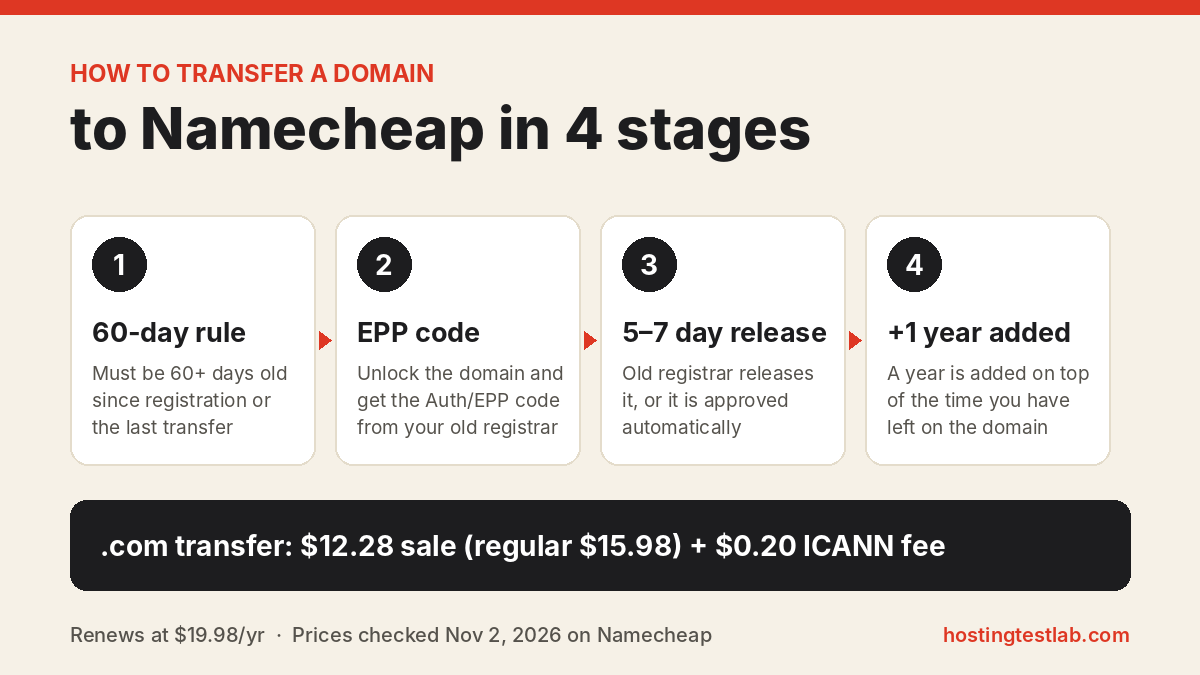
Here is how to transfer a domain to Namecheap in four moves: check that the domain is at least 60 days old, unlock it at your current registrar, copy its EPP code, and order the transfer on Namecheap’s Transfer page. Namecheap says a transfer takes anywhere from 30 minutes to 8 days. On November 2, 2026, a .com transfer was listed at a sale price of $12.28 (regular $15.98), and it adds one year to your registration.
Prices were checked on November 2, 2026 on Namecheap’s US domain price list; transfer rules were checked on October 26, 2026 in its knowledge base articles on transfers, transfer statuses and downtime.
| Question | Answer from Namecheap’s pages |
|---|---|
| Minimum domain age | 60 days since registration or the last transfer |
| What you need | An unlocked domain and its Auth/EPP code |
| Total time | 30 minutes to 8 days |
| Release by old registrar | 5–7 calendar days, then approved automatically |
| .com transfer price | $12.28 sale price (regular $15.98), plus a $0.20 ICANN fee |
| Extra time added | 1 year, on top of the time you have left |
| Domain privacy | Free, where the extension supports it |
Before you start: three checks that stop most failed transfers
The 60-day rule. For .com, .net, .org, new extensions such as .tech, and some country domains such as .co, .me and .tv, the domain must have been registered or transferred at least 60 days ago. Check the creation date in your current registrar’s dashboard first.
The 45-day rule after expiration. If your domain expired and you renewed it late with your old registrar, Namecheap warns not to transfer it within 45 days of the old expiration date. Under ICANN rules, that late renewal year can be taken back, and you can lose what you paid for it.
Your nameservers. A transfer does not change your DNS. Your nameservers stay exactly as they are. If they belong to your hosting company, the site and email keep running. If the domain uses your old registrar’s free default DNS, that registrar may delete the DNS zone after the transfer, and your website and email can go offline. The downtime section below shows how to avoid that.
How to transfer a domain to Namecheap, step by step
- Remove the registrar lock. In your current registrar’s domain settings, turn off the transfer lock. Namecheap needs the WHOIS status to read “OK” or “Active”. A status such as clientTransferProhibited means the domain is still locked.
- Get the Auth/EPP code. Request the transfer code in your current registrar’s account. If the dashboard has no button for it, Namecheap’s advice is to contact that registrar and ask for the code. A domain on hold at the old registrar cannot move until that registrar removes the hold.
- Make urgent DNS changes now. Once the transfer starts, you cannot update the nameservers until it finishes. If you plan to move hosting, change the nameservers before you order.
- Order the transfer on Namecheap. Sign in and open Transfer under the Domains menu. Type the domain as domain.tld, with no https:// and no www, and click Transfer. Tick the boxes confirming the domain is ready, paste the EPP code, add the transfer to your cart and check out.
- Let the old registrar release it. The domain shows as pendingTransfer at the registry. Your old registrar has 5–7 calendar days to release it. If it does nothing, the transfer is approved automatically. To speed things up, Namecheap suggests asking your old registrar to release the domain sooner.
- Check the result. Namecheap emails the address on your Namecheap account when the transfer completes. The domain is renewed for one year, and its status changes to clientTransferProhibited, which means Namecheap’s transfer lock is back on.
How long does a domain transfer take?
Namecheap gives a range of 30 minutes to 8 days, depending on the extension and how fast your old registrar releases the domain. Your Domain List shows the current stage:
| Status in your account | What it means | What to do |
|---|---|---|
| Awaiting authorization code | The transfer has not started | Enter the EPP code with “Authorize Transfer” |
| Transfer will begin shortly | Namecheap is starting it at the registry | Nothing |
| Awaiting release from previous registrar | Approved and waiting for the old registrar | Wait about 5–6 days, or ask the old registrar to release it sooner |
A .uk domain has one extra step. Its IPS tag must be changed to NAMECHEAP-INC at your old registrar within 7 days of the transfer starting, or the transfer fails automatically.
What a Namecheap transfer costs
You pay the transfer price once, and it includes a one-year renewal. Namecheap’s transfer page says any remaining time is added to that year, so a .com with eight months left ends up with about one year and eight months. If your domain sits at GoDaddy today, our Namecheap vs GoDaddy comparison shows what each charges from year two.
| Extension | Transfer price | Renewal price | ICANN fee |
|---|---|---|---|
| .com | $12.28 (sale) | $19.98 | +$0.20 |
| .net | $12.98 (sale) | $18.58 | +$0.20 |
| .org | $12.28 (sale) | $18.98 | +$0.20 |
| .co | $38.48 | $45.48 | Not marked |
| .io | $65.98 | $75.98 | Not marked |
The timing matters for .com. Since November 1, 2026, Namecheap’s regular .com price is $15.98 a year for registrations and transfers and $19.98 for renewals, before the ICANN fee. On November 2, a .com transfer was on sale at $12.28, or $12.48 with the fee; at the regular price it costs $16.18. Compare the $19.98 renewal with your current registrar’s renewal fee before you move, because that is what you pay from the second year. Our Namecheap domain renewal price guide explains the increase, and the Namecheap renewal price guide shows what hosting renewals add up to.
Domain privacy is free for life on transfers, according to the transfer page. The page also notes that privacy is not available for some extensions.
How to avoid website and email downtime
Namecheap says the transfer itself does not cause downtime. The risk comes only from your old registrar’s default nameservers, which can stop answering once the domain leaves. Hosting nameservers, private nameservers and third-party DNS such as Namecheap’s PremiumDNS keep working without changes.
If your domain uses the old registrar’s DNS and you cannot afford an outage, Namecheap’s recommended order is:
- Add the domain to Namecheap FreeDNS (Domains, then FreeDNS) and verify it with a TXT record, which stays valid for 10 days, or by email, a link valid for 48 hours.
- Copy every A, MX, CNAME and TXT record from your old registrar into Namecheap’s Advanced DNS.
- Point the domain to at least two FreeDNS nameservers and wait 24–48 hours for the change to spread.
- Remove the old registrar’s nameservers, then start the transfer.
Missing MX records stop your email even while the website still loads. If you also move your mailbox, our Namecheap email hosting guide covers the options.
After the transfer: connect the domain to hosting
A domain on its own shows no website. It needs hosting, and the difference between the two is explained in our domain vs hosting guide. I run my own sites on Namecheap shared hosting. My plan allows many domains, so after a domain is in my account I add it in cPanel and install WordPress with the one-click installer. The steps are in our guide on how to add a domain in cPanel.
If the site is moving from another host at the same time, follow our guide on how to move a WordPress site to a new host before you switch the nameservers.
FAQ
Do I lose the time left on my domain when I transfer it?
No. Namecheap adds the remaining time to the one-year renewal included in the transfer. The exception is a domain renewed late after expiring: within 45 days of the old expiration date, that renewal year can be revoked.
Can I change nameservers while the transfer is pending?
No. Nameservers are frozen from the moment the transfer starts until it completes, which can be up to 8 days. Make DNS changes before you enter the EPP code.
Why is my transfer stuck on “Awaiting release from previous registrar”?
The old registrar has not released the domain yet. It completes automatically in about 5–6 days unless that registrar rejects it. Asking that registrar to release the domain sooner is the fastest fix.
Do all extensions add one year on transfer?
No. Namecheap lists exceptions, including .uk and .im domains, where no year is added. A .ai transfer adds two years instead of one.