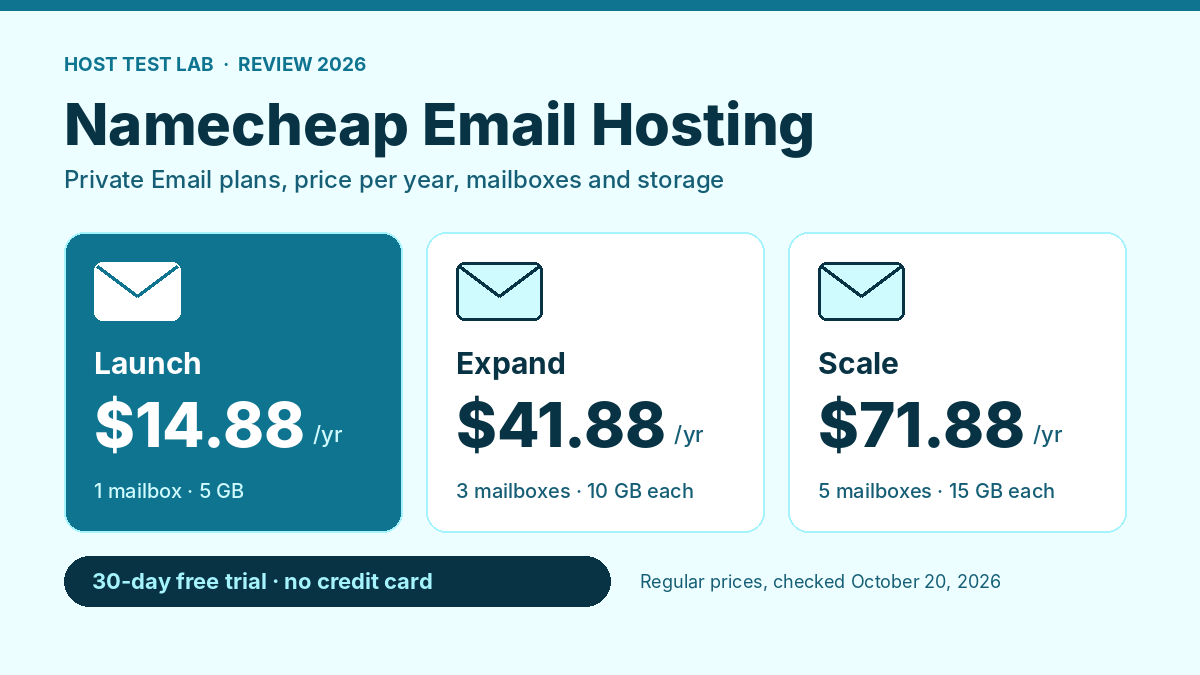
Namecheap email hosting is one of the cheapest ways to get a professional address like you@yourdomain.com: its Private Email Launch plan costs $14.88 a year for one mailbox with 5 GB of storage, and a 30-day free trial needs no credit card. It suits individuals and small teams who want webmail, a calendar and spam filtering without paying Google Workspace prices. It is not the pick if you need large mailboxes, shared documents or heavy sending, and if you already host with Namecheap, the cPanel email included with your plan may be enough. Keep the contact email on your Namecheap account at a separate provider, though; our Namecheap account locked or suspended guide explains why.
Prices, plan features and limits were checked on October 20, 2026 on Namecheap’s official Private Email page and its help center articles on sending limits and on Private Email versus cPanel email.
| Question | Short answer |
|---|---|
| Cheapest plan | Launch, $14.88 a year, 1 mailbox |
| Cheapest for 3 people | Launch + 2 extra mailboxes, $32.64 a year |
| Storage per mailbox | 5 GB, 10 GB or 15 GB |
| Free trial | 30 days, no credit card |
| Sending limit | 500 emails an hour per mailbox |
| Included with shared hosting? | No, but cPanel email is |
Namecheap email hosting plans and prices
Namecheap sells its email hosting as Private Email, in three plans. Older reviews call them Starter, Pro and Ultimate; the official page now names them Launch, Expand and Scale.
| Plan | Mailboxes | Storage per mailbox | Aliases | Regular price | Extra mailbox |
|---|---|---|---|---|---|
| Launch | 1 | 5 GB | 10 | $14.88/year | $8.88/year |
| Expand | 3 | 10 GB | 50 | $41.88/year | $25.88/year |
| Scale | 5 | 15 GB | Unlimited | $71.88/year | $39.88/year |
On the checking date, the page also listed a promo code that cuts the first payment: by 20%, 25% and 30% on yearly plans, and by 28%, 33% and 38% on two-year plans. The discount applies to the first purchase only and does not cover extra mailboxes. Renewals are at the regular price.
The four-year cost
Assumptions: two paths are shown for each plan. The two-year path is the discounted first two-year term plus one two-year renewal. The trial path starts with the free trial, which converts to a regular yearly plan, renewed each year. Tax is excluded.
| Plan | Two-year path, 4 years | Trial path, 4 years | Per mailbox per year (two-year path) |
|---|---|---|---|
| Launch (1 mailbox) | $51.12 | $59.52 | $12.78 |
| Expand (3 mailboxes) | $139.92 | $167.52 | $11.66 |
| Scale (5 mailboxes) | $233.04 | $287.52 | $11.65 |
The two-year path is the cheaper one: $21.36, $56.16 or $89.28 for the first two years, then $29.76, $83.76 or $143.76 for the renewal. The trial is free, but because trial periods count as a purchase, the intro discount is no longer available afterward, so the trial path costs $8.40 more on Launch over four years. Use the trial to test, then decide before it converts.
One calculation changes the plan choice for small teams. Launch plus two extra mailboxes costs $32.64 a year at regular prices, less than Expand at $41.88 for the same three mailboxes. Expand gives each mailbox 10 GB instead of 5 GB and 50 aliases instead of 10, so pay for it only if you need the room.
What is included, and the limits that matter
Features on every plan
All three plans list secure webmail with a calendar, an AI email assistant, auto-reply, forwarding, CalDAV and CardDAV sync, and IMAP, SMTP and POP3, so the mailbox works in Outlook, Apple Mail and phone apps. Spam filtering uses Jellyfish Anti-Spam on every plan, along with two-factor authentication. Expand and Scale add advanced storage encryption, and Scale adds what Namecheap calls premium email delivery.
Storage is the main limit
At 5 GB, a Launch mailbox is small. One that receives invoices, photos and attachments every day fills much faster than one used for short messages. Expand doubles the room to 10 GB per mailbox, and Scale gives 15 GB. Namecheap’s help center also notes that Private Email has no file storage, so it is email only, not a document drive.
Sending limits
Namecheap’s sending-limits article, updated September 30, 2026, sets paid plans at 500 emails an hour per mailbox and any single email at 50 recipients across To, CC and BCC. During the free trial, the limit is 20 emails an hour per mailbox. That is plenty for day-to-day business mail, but it rules out newsletters or cold outreach from these mailboxes; use a dedicated email marketing service for that.
Trial rules
The 30-day trial needs no credit card and converts to a yearly plan. Namecheap allows up to 5 Launch trials per account but only 1 Expand or Scale trial, and each domain can use a trial only once. The page also says the billing cycle of an existing subscription cannot be changed for now, so choose yearly or two-year at the start.
Private Email or the cPanel email in your hosting
If you host your website on Namecheap shared hosting, you already have cPanel email. Stellar includes 30 mailboxes, and Stellar Plus and Stellar Business include unlimited mailboxes. Namecheap’s help center lists the differences:
- Storage: cPanel email on shared hosting accounts is capped at 10 GB. Private Email is a separate service with its own storage.
- Features: cPanel email uses the Roundcube webmail and has no calendar, AI assistant or auto-reply in Namecheap’s comparison. Private Email includes them.
- Sending: cPanel email limits range from 50 to unlimited emails depending on the package.
- One or the other: you can use only one at a time on a domain. Switching to Private Email means pointing the domain’s MX records to it, and cPanel email then stops working for that domain.
For a niche or affiliate site that needs a contact address, cPanel email is free and enough. I run my own sites on Namecheap shared hosting, and the mailboxes come with the plan. For a business where email is daily work, Private Email keeps mail separate from the website, so a hosting problem does not take the inbox with it. Our Namecheap hosting review covers the Stellar plans in full. Our Namecheap cPanel guide shows where those mailboxes are created.
How setup works
Namecheap’s getting-started article, updated October 8, 2026, gives three steps in this order:
- Set up the DNS records. The steps differ depending on whether your domain is registered with Namecheap, hosted with Namecheap or uses another company’s DNS, and each case has its own guide.
- Create the mailboxes. Do this once the DNS records are in place.
- Connect your apps. Add the mailbox to Outlook, Apple Mail or your phone with the settings from the client-setup guide, or use the webmail in a browser.
The order matters. If you create mailboxes before the DNS records point to Private Email, mail sent to the new address does not arrive there yet. If your domain is already registered at Namecheap, the DNS records and the mailboxes are managed in the same account.
Reliability, scale and support
Namecheap says Private Email passed 1 million customers in August 2024 and that its users sent and received more than 1.5 billion emails in the year before. Those are the provider’s own figures, not independent measurements. TechRadar’s Namecheap email review, published July 2024, calls the service reliable and secure and lists small storage and missing advanced features as its weak points; it reports no measured deliverability or uptime figures.
Support is 24/7 live chat and tickets. In my experience with Namecheap hosting, its online support has been fast, and Namecheap emails me before it makes changes on its side. That is my experience with hosting support, not email support specifically.
Who Namecheap email hosting suits, and who should look elsewhere
- A freelancer or one-person business: choose Launch. One professional address costs $12.78 a year on the two-year path.
- A team of two to five: choose Launch with extra mailboxes if 5 GB each is enough, or Expand for 10 GB each. Five mailboxes on Scale cost $11.65 each per year.
- A site owner on Namecheap hosting who just needs a contact address: skip Private Email and use the included cPanel email.
- Anyone who stores years of attachments: look elsewhere or plan for Scale. 5 GB is small.
- Newsletters or bulk sending: look elsewhere. The 500-an-hour and 50-recipient limits are not built for it.
Two alternatives
Hostinger includes email with its hosting: Premium lists 2 mailboxes per website, free for the first year, as part of the $119.52 four-year plan. The pricing page does not list the mailbox price after that year, so check it before you rely on them. Our Hostinger email hosting review lists what those mailboxes cost once the free year ends.
Cloudways has no built-in email and sells Rackspace mailboxes at $1.50 per mailbox per month, or $18 a year, against $14.88 for a Launch mailbox at Namecheap. Our Cloudways pricing guide covers its other add-ons.
Final recommendation
Namecheap email hosting is a strong low-cost choice for a professional address: Launch at $14.88 a year, or $51.12 over four years on the two-year path, with webmail, a calendar and spam filtering included. Start with the free trial, pick the two-year term when you buy, and add single mailboxes before upgrading to Expand. If your site is already on Namecheap hosting and you only need a contact address, the included cPanel email costs nothing extra.
Namecheap email hosting FAQ
Can I use Namecheap Private Email with a domain registered elsewhere?
Yes. Namecheap’s setup guide has a separate path for domains that use another company’s DNS. Namecheap lists a few endings it does not support, including .ru and .su, and trials are not available for endings such as .tk and .ml.
How much does Namecheap say it saves against Google Workspace?
Namecheap’s page compares its $14.88 Launch plan with $84 a year for Google Workspace and $72 for Microsoft 365, using starting prices it says were updated in April 2026. Those are Namecheap’s own comparison figures, so check the current price at each provider.
Can I switch from cPanel email to Private Email later?
Yes. Point the domain’s MX records to Private Email, then create the mailboxes. From that point, cPanel email stops receiving mail for that domain, so move any messages you want to keep first.