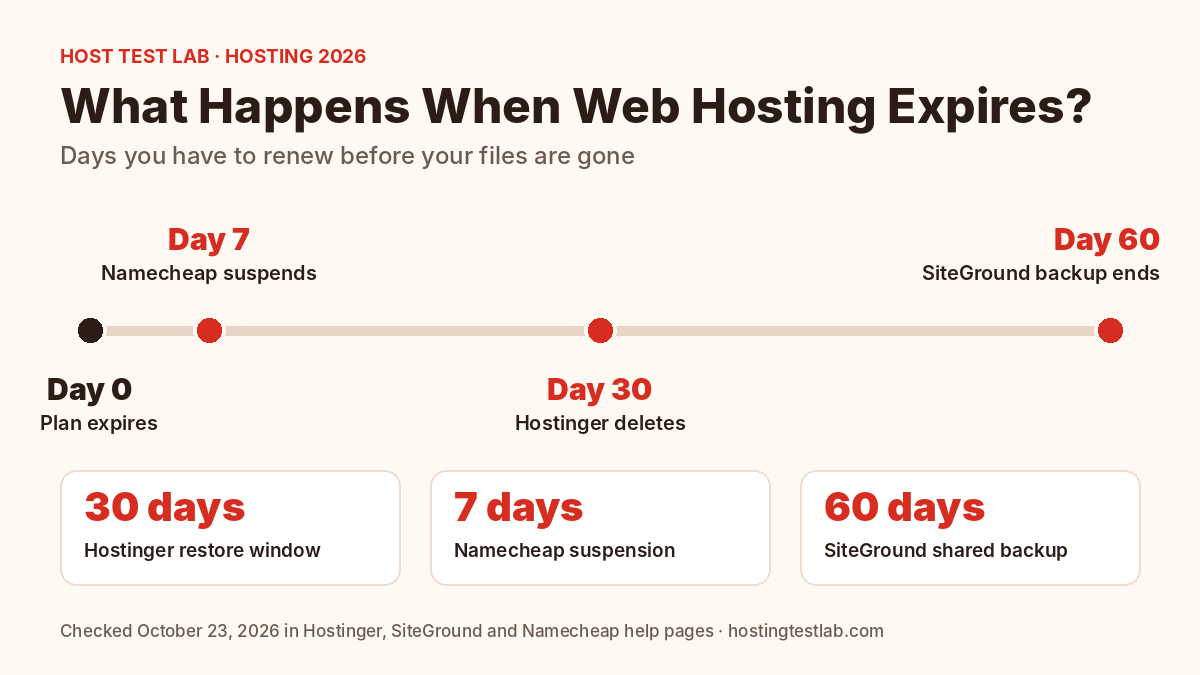
What happens when web hosting expires is the same at every major host: your website goes offline within days, your files are kept for a short recovery window, and then they are deleted for good. How long that window lasts is what differs. Hostinger keeps an expired plan restorable for 30 days, SiteGround keeps a shared account for up to 30 days and a backup for up to 60, and Namecheap suspends and cancels a shared account 7 days after an unpaid billing date. After those deadlines, a site with no backup of your own may be gone.
The rules below were checked on October 23, 2026 in Hostinger’s help articles on expired and inactive plans (both updated October 22, 2026), SiteGround’s knowledge base article on not renewing (updated August 26, 2026), and Namecheap’s invoicing policy (updated June 9, 2026), hosting life cycle article and hosting terms of service.
What happens when web hosting expires: the timeline by host
| Hostinger | SiteGround | Namecheap | |
|---|---|---|---|
| Website after expiry | Stops working | Shows “This account has been suspended” | Suspended 7 days after the unpaid billing date |
| Window to renew and restore | 30 days | Up to 30 days (shared), 7 to 14 days (cloud) | Reactivation by request; no deadline stated |
| Backup kept | Until the 30 days end | Up to 60 days (shared) | Deleted on termination, per its terms |
| Cost to restore | The renewal payment | Renewal plus a restoration service fee | The full renewal fee; terms list a $15.00 reinstatement fee |
In every case, renewing quickly costs only the renewal price. Waiting until the window closes can cost the whole site.
Hostinger: 30 days, then permanent deletion
When a Hostinger plan is not paid, Hostinger’s help article says “your websites will stop working” and the dashboard leaves only a few options. The plan stays in Expired status for 30 days. Within that time, you renew from the “Your to-dos” section of the dashboard, and Hostinger says the site usually returns within 30 minutes to a few hours. After 30 days, the plan is canceled, backups are no longer available and the plan is “permanently deleted”, so it cannot be renewed or restored.
Email is a separate case: Hostinger’s article says email is not covered by the plan’s reactivation or backups and points to a separate recovery process. If your business email runs on the same plan, treat the expiry date as an email deadline too. Hostinger Premium renews at $10.99 a month, as our guide to the Hostinger renewal price explains.
SiteGround: 30 days to renew, 60 days for a backup
SiteGround’s knowledge base says an expired account is kept for a maximum of 30 calendar days on shared plans and 7 to 14 days on cloud plans. During that time, visitors see the message “This account has been suspended”, and you renew from Client Area, then Billing, then Renewals. After the grace period, the account is terminated, but SiteGround says it keeps a backup copy for up to 60 days on shared plans, restorable “upon payment for the renewal and restoration service”. The article does not state the fee for that service.
That 60-day backup gives SiteGround the longest safety net of the three, but the restore costs extra and the renewal is high: StartUp renews at $17.99 a month.
Namecheap: suspension after 7 days
Namecheap’s process starts earlier and moves faster. Its life cycle article says shared hosting is invoiced 7 days before the billing date, with an alert status 30 days before expiry on annual and two-year plans. If auto-renewal fails, Namecheap retries the card 2 and 5 days after the billing date. If the invoice is still unpaid 7 days after the billing date, the account “will be suspended and cancelled”.
A canceled account can still be reactivated: you top up your Namecheap balance with the full renewal fee and contact the Billing team by live chat or email. Namecheap says it recovers the account from a backup if one exists, and that “in most cases” it can restore the package even without one. Its hosting terms are stricter on paper: they list a $15.00 fee to reinstate a suspended or terminated account and say backup copies are “permanently deleted upon termination”. Stellar renews at $55.88 for one year, as our guide to the Namecheap renewal price shows.
I run my own sites on Namecheap shared hosting, and Namecheap emails me before it makes changes or updates on its side. Those emails, plus the invoice 7 days ahead, are the reminders to watch for.
What expires with the hosting, and what does not
- Your website and files: offline right away, then deleted after the host’s window.
- Email on the hosting plan: stops with the plan. At Hostinger, its recovery is handled separately from the website.
- Your domain: a separate product with its own renewal date. It stays registered to you when the hosting expires, and you can point it to a new host. Our domain vs hosting guide explains the two bills.
How to keep your site from expiring
- Turn on auto-renewal and check the card. An expired card is an easy way to miss a renewal, and Namecheap pauses its retries for 7 days when a card is invalid.
- Keep your own backup. Namecheap’s terms say you must keep independent backup copies, and none of the three hosts promises your files after its window closes.
- Put the renewal date in your calendar 30 days ahead. That matches Namecheap’s alert period and gives you time to compare prices if you plan to move.
- If you are leaving, move first. Copy the site to the new host before the old plan ends. Our guide on how to move a WordPress site to a new host shows the steps.
Check Hostinger plans Visit SiteGround Check Namecheap plans
Verdict
So what happens when web hosting expires? The site goes dark within days, and you have a fixed number of days to pay before the files are deleted: 30 at Hostinger, up to 30 at SiteGround with a paid backup restore up to day 60, and a 7-day path to suspension at Namecheap. Renew within the first week and your files are still there at all three hosts. Past the deadline, only your own backup is certain to save the site.
Web hosting expiry FAQ
Can I change plans when I renew an expired plan?
At Hostinger, yes. Its reactivation steps let you choose to renew or upgrade and pick a billing period before you pay, so an expired plan can come back as a bigger one. Plans deactivated for reasons other than non-payment cannot be reactivated this way.
Does a SiteGround cloud plan have a longer grace period?
No, a shorter one. SiteGround keeps an expired cloud account for 7 to 14 days instead of up to 30, although it says it may keep the files for up to 60 days.
Does Namecheap charge interest on an unpaid hosting bill?
Its hosting terms list a debt service charge of 1.5% a month on overdue balances, on top of the $15.00 reinstatement fee for a suspended or terminated account.