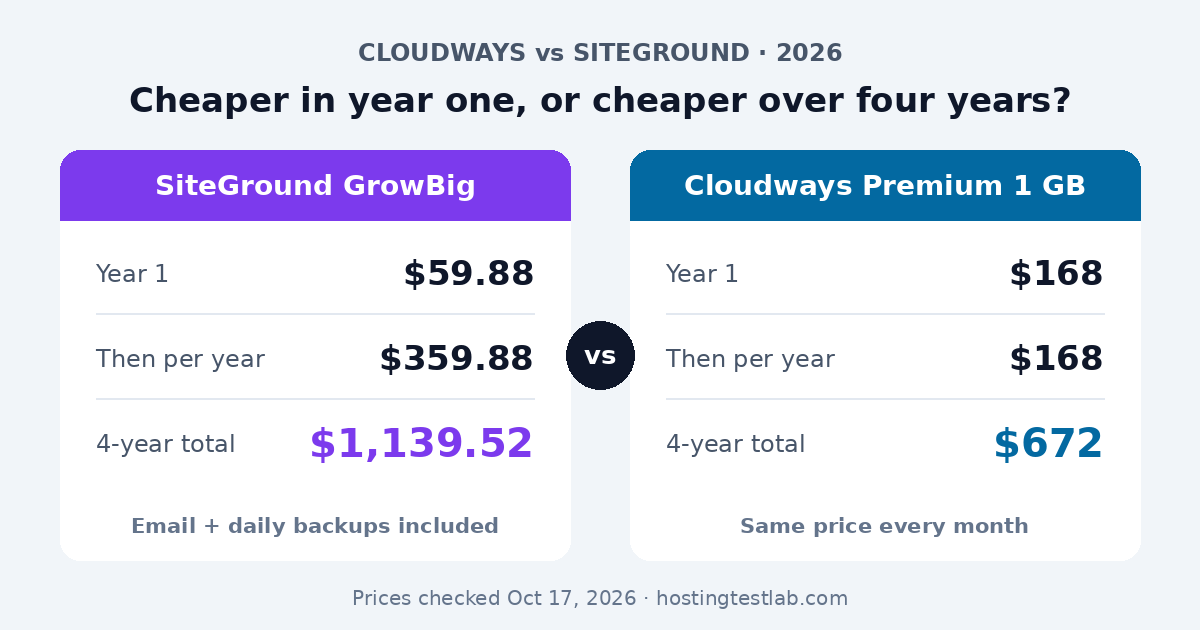
In the Cloudways vs SiteGround choice, SiteGround is cheaper in year one and Cloudways is cheaper every year after. SiteGround GrowBig costs $59.88 for the first 12 months, then renews at $29.99 a month. Cloudways’ DigitalOcean Premium 1 GB server costs $14 a month from day one, with no renewal increase. Pick SiteGround if you want email, daily backups and a 30-day money-back guarantee in one simple plan. Pick Cloudways if you run several sites and plan to keep them for years.
Prices were checked on October 17, 2026 on SiteGround’s and Cloudways’ US pricing pages, plus Cloudways’ DigitalOcean and help pages. Speed and uptime figures come from Gizmodo, Cybernews, BloggersPassion and Element.how, with each test’s period in the table below.
| Question | SiteGround | Cloudways |
|---|---|---|
| Hosting type | Managed shared | Managed cloud server |
| First-year cost | $59.88 (GrowBig) | $168 (Premium 1 GB) |
| Price after year one | $29.99/mo | $14/mo, unchanged |
| Four-year total | $1,139.52 | $672 |
| Email included | Yes | No, $1.50/mailbox |
| Money-back | 30 days | No, 3-day free trial |
| Best for | One to a few sites, simple setup | Several sites, long term |
Cloudways vs SiteGround pricing: the real cost
The two hosts bill in completely different ways. SiteGround sells shared plans with a low first-year price, prepaid for 12 months, and a much higher renewal price. Cloudways rents you a cloud server, counts usage by the hour and charges once a month, at the same rate every month.
| Plan | Intro price | Billing term | Paid upfront | Renewal price | Source |
|---|---|---|---|---|---|
| SiteGround StartUp | $2.99/mo | 12 months prepaid | $35.88 | $17.99/mo | Official |
| SiteGround GrowBig | $4.99/mo | 12 months prepaid | $59.88 | $29.99/mo | Official |
| SiteGround GoGeek | $7.99/mo | 12 months prepaid | $95.88 | $44.99/mo | Official |
| Cloudways DigitalOcean Premium 1 GB | $14/mo | Monthly, billed hourly | $0 | $14/mo | Official |
| Cloudways DigitalOcean Premium 2 GB | $28/mo | Monthly, billed hourly | $0 | $28/mo | Official |
The four-year cost
Assumptions: SiteGround is one 12-month intro term plus three 12-month renewals at the renewal price; Cloudways runs all 48 months at the listed rate; no add-ons or tax; the per-site column assumes five small sites.
| Plan | Year 1 | Years 2 to 4, per year | Four-year total | Average per month | Websites | Per site (5 sites) |
|---|---|---|---|---|---|---|
| SiteGround StartUp | $35.88 | $215.88 | $683.52 | $14.24 | 1 | Not possible |
| SiteGround GrowBig | $59.88 | $359.88 | $1,139.52 | $23.74 | Unlimited | $227.90 |
| SiteGround GoGeek | $95.88 | $539.88 | $1,715.52 | $35.74 | Unlimited | $343.10 |
| Cloudways Premium 1 GB | $168 | $168 | $672 | $14 | Unlimited | $134.40 |
| Cloudways Premium 2 GB | $336 | $336 | $1,344 | $28 | Unlimited | $268.80 |
Year one favors SiteGround: GrowBig costs $59.88, while the Cloudways server costs $168 over the same 12 months. The picture flips at the first renewal. GrowBig then costs $359.88 a year, more than double Cloudways’ $168, so by the end of year four GrowBig has cost $467.52 more. SiteGround also asks for each year in advance, while Cloudways can be stopped in any month.
Visit SiteGround Check Cloudways plans
What you get for the money
Websites and traffic
SiteGround StartUp hosts one website, and its FAQ sizes it for around 10,000 visits a month. GrowBig allows unlimited websites and approximately 100,000 visits, and GoGeek 400,000+. Cloudways lists unlimited websites and unlimited visits on every server, so the limit is the server’s RAM and CPU instead of a visit estimate. In practice, a second site on SiteGround means moving from StartUp to GrowBig, which adds $456 over four years. A second site on Cloudways adds $0 until the server runs out of resources.
Staging
SiteGround lists staging on GrowBig and GoGeek only, not on StartUp. Cloudways includes staging and cloning on every server. If you want to test plugin and theme updates on a copy before they reach your live site, the cheapest way on SiteGround is GrowBig, and on Cloudways it is the $14 Premium server. Over four years, that is $1,139.52 for staging on SiteGround against $672 on Cloudways, so if staging is a must-have, Cloudways gets you there for less than half the price. Our guide on how to create a WordPress staging site shows how the process works.
Backups
SiteGround includes free daily backups on all three plans, and adds on-demand backups on GrowBig and GoGeek. Cloudways bills off-site backup storage at $0.033 per GB per server. For a few small sites with 10 GB of backups, that is $0.33 a month, or $15.84 over four years. It is a small cost, but it is a cost, while SiteGround’s daily backups are part of the price.
Email and storage
SiteGround includes email on every plan. Cloudways does not, and its Rackspace add-on costs $1.50 per mailbox per month, or $72 per mailbox over four years. Three business inboxes would add $216 to Cloudways’ four-year total, which cuts its lead over GrowBig from $467.52 to $251.52. On storage, GrowBig gives 50 GB against 25 GB on the Cloudways Premium 1 GB server, so image-heavy sites fill Cloudways sooner. The same gap holds one step up: GoGeek includes 100 GB, double the 50 GB on the Premium 2 GB server, its closest Cloudways match on price. Our guide to Cloudways Standard vs Premium explains what the Premium label adds.
Server choice and setup
On Cloudways, you pick the cloud behind your server: DigitalOcean, Vultr, Linode, AWS or Google Cloud, and then a data center. That choice matters more than it sounds. In published tests of Cloudways, a DigitalOcean Premium 1 GB server measured from the US answered in 200 ms (BloggersPassion), while a server in Singapore took 3.66 seconds to load a page for US visitors (Kripesh Adwani). For a US audience, a US data center is the first thing to get right. SiteGround’s shared plans do not ask you to make this choice, which is one less way to get it wrong.
Cloudways also says it has its own dashboard, “eliminating the need for cPanel.” I run my own sites on Namecheap shared hosting, where I add new domains in cPanel and install WordPress with the one-click installer, and I find that layout easy to follow. If cPanel is what you know, expect a short learning curve on Cloudways: you create a server first, then add each WordPress site as an application on it.
Speed, uptime and support
| Source and period | Setup | Metric | SiteGround | Cloudways |
|---|---|---|---|---|
| Gizmodo, 6 months (Pingdom), page updated February 2026 | SiteGround Jump Start cloud vs Cloudways DigitalOcean 8 GB | Average response time | 211 ms | 252 ms |
| Gizmodo, same test | Same | Uptime | 99.99%, 3 outages under 10 minutes | 99.98%, 5 outages over 30 minutes |
| Gizmodo, GTmetrix, San Antonio, TX | Same | Fully loaded time | 1.5 s | 1.4 s |
| Gizmodo, same test | SiteGround shared plans | Average response time | 339 ms | Not tested |
| Cybernews, just under 2 weeks (GTmetrix and Grafana), updated May 2026 | SiteGround GrowBig, US | Uptime / TTFB / fully loaded | 100% / 0.677 s / 1.699 s | Not tested |
| BloggersPassion, last 6 months, updated February 2026 | Cloudways DigitalOcean Premium 1 GB, tested from New York | Uptime / US response | Not tested | 99.994% / 200 ms |
| Element.how, GTmetrix, 21 runs from 7 locations, October 2023 | Plans not named | Average load time | 2.5 s | 3.19 s |
The tests do not agree on speed. SiteGround had the faster server response in Gizmodo’s test and the faster page load in Element.how’s, but Cloudways loaded the full page 0.1 seconds faster in Gizmodo’s GTmetrix run. With mixed results and different setups, neither host is a clear speed winner. Note that Gizmodo’s head-to-head used SiteGround’s cloud plan, not the shared GrowBig plan, and SiteGround’s shared plans averaged 339 ms in the same test. On uptime, every test kept both hosts at 99.98% or higher, a difference of a few minutes a month. The single-host tests point the same way: the entry plans each host would sell to a small site, GrowBig and the Premium 1 GB server, both stayed above 99.99% in their test periods.
On support, the channels differ. SiteGround lists 24/7 live chat, 24/7 phone support and tickets. Cloudways lists 24/7 live chat and tickets, with no phone line on its pricing page, and sells a faster Advance Support add-on at $100 a month. That add-on alone costs more per month than any SiteGround shared plan at renewal. If being able to call someone during an outage matters to you, SiteGround is the only one of the two that offers it.
Who should pick which
- One site, first year, tight budget: SiteGround StartUp. The first 12 months cost $35.88, the lowest cash outlay here.
- Several affiliate or niche sites kept for years: Cloudways. Five sites on the Premium 1 GB server cost $134.40 each over four years, against $227.90 each on GrowBig.
- A small business that needs email and wants one bill: SiteGround GrowBig. Email is included, and three Cloudways mailboxes would add $216 over four years.
- Someone who wants a refund window: SiteGround, with its 30-day money-back guarantee. Cloudways only offers a 3-day trial.
- A growing store that needs more server power: Cloudways Premium 2 GB at $1,344 over four years, compared with GoGeek at $1,715.52.
One thing would change this advice: if you only plan to keep a site for 12 months, SiteGround’s first-year price wins in every situation above.
For more on each host, see our SiteGround review and our Cloudways review. If neither fits, compare more Cloudways alternatives.
Final recommendation
The Cloudways vs SiteGround decision comes down to time. For a single site you may drop within a year, or a business that wants email and backups included, choose SiteGround GrowBig at $59.88 for the first year. For several sites you plan to keep, choose Cloudways: the Premium 1 GB server costs $672 over four years against $1,139.52 for GrowBig, and its price never rises at renewal.
Explore SiteGround hosting options Explore Cloudways hosting options
Cloudways vs SiteGround FAQ
Is Cloudways cheaper than SiteGround?
Not in year one, but yes over time. Cloudways’ DigitalOcean Premium 1 GB server, at $14 a month, costs $672 over four years, less than SiteGround StartUp’s $683.52, and it hosts unlimited sites instead of one.
Can I move a site from SiteGround to Cloudways for free?
Cloudways moves your first website from any host for free. Additional sites are not covered by that offer. Our guide on how to move a WordPress site to a new host covers doing the rest yourself.
Does Cloudways have a money-back guarantee like SiteGround?
No. Instead, Cloudways offers a 3-day trial that does not ask for a credit card, so you can test your site before you pay anything.
Which is better for a WordPress beginner?
SiteGround is simpler to start with: you pick a plan and install WordPress, with email and daily backups already included. On Cloudways you choose a cloud provider, server size and data center first, and a wrong data center can slow the site for your visitors.
Which one renews at a higher price?
SiteGround. GoGeek goes from $7.99 to $44.99 a month at renewal, more than five times the intro price. Cloudways’ server prices stay the same every month.