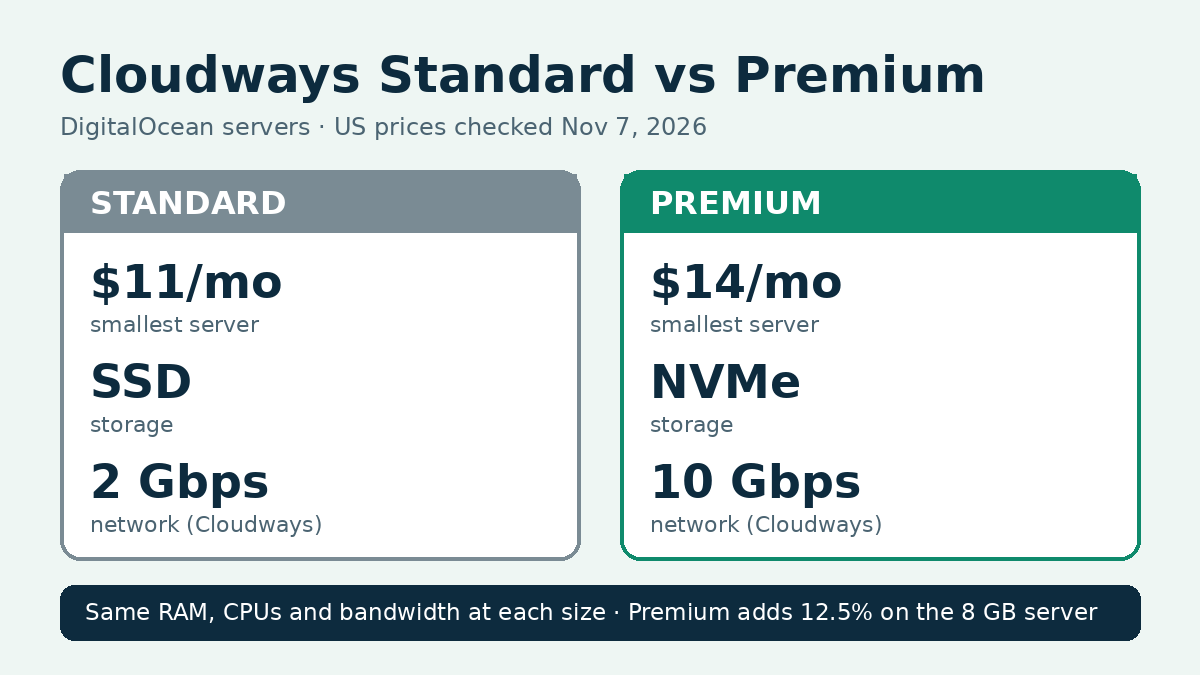
In Cloudways Standard vs Premium, Premium costs $3 to $11 more a month for the same RAM, CPU count and bandwidth, and the extra money buys newer Intel processors, NVMe storage instead of standard SSD, and faster networking. Pick Premium for a WooCommerce store or any site that runs a lot of uncached pages. Standard is enough for a blog or brochure site where caching does most of the work, and it saves $36 a year on the smallest server. Prices and specs were checked on November 7, 2026 on Cloudways’ US pricing page for DigitalOcean servers and in Cloudways’ help center. Performance figures come from Cloudways’ own published tests, labeled as such below.
| Standard | Premium | |
|---|---|---|
| Smallest server | $11/mo | $14/mo |
| Processor | 2nd generation or earlier Intel | 2nd or 3rd generation Intel Xeon Scalable |
| Storage | Standard SSD | NVMe |
| Network speed (Cloudways’ description) | Up to 2 Gbps | Up to 10 Gbps |
| RAM, vCPU, bandwidth | Same at each size | Same at each size |
| Websites | Unlimited | Unlimited |
Black Friday: code BFCM802 gives 80% off Cloudways for 2 months (up to $200 off a month), until November 30.
Cloudways Standard vs Premium pricing
Standard and Premium are two server types on Cloudways’ DigitalOcean option, not separate Cloudways plans. Both are billed monthly with no prepaid term, and the pricing page also lists an hourly rate, so a server you delete early costs only the hours it ran.
| Size | RAM / vCPU | Standard | Premium | Difference |
|---|---|---|---|---|
| Micro | 1 GB / 1 | $11/mo (25 GB SSD) | $14/mo (25 GB NVMe) | +$3 (27%) |
| Small | 2 GB / 1 | $24/mo (50 GB SSD) | $28/mo (50 GB NVMe) | +$4 (17%) |
| Medium | 4 GB / 2 | $46/mo (80 GB SSD) | $54/mo (80 GB NVMe) | +$8 (17%) |
| Large | 8 GB / 4 | $88/mo (160 GB SSD) | $99/mo (160 GB NVMe) | +$11 (12.5%) |
Bandwidth is identical at each size: 1 TB on Micro, 2 TB on Small, 4 TB on Medium and 5 TB on Large. Offsite backup storage costs $0.033 per GB on both types, and the listed prices exclude tax.
Four-year cost
| Size | Standard, 4 years | Premium, 4 years | Extra for Premium | Premium per site at 3 sites, 4 years |
|---|---|---|---|---|
| Micro | $528 | $672 | $144 | $224 |
| Small | $1,152 | $1,344 | $192 | $448 |
| Medium | $2,208 | $2,592 | $384 | $864 |
| Large | $4,224 | $4,752 | $528 | $1,584 |
Assumption: 48 months at today’s monthly rate, with no backups, add-ons, tax or promotions. Because Cloudways has no intro price and no renewal jump, the gap stays the same every month. The percentage gap shrinks as servers get bigger: Premium adds 27% on Micro but 12.5% on Large. On a Medium server shared by three sites, Premium works out to $2.67 more per site per month.
The pricing page currently shows a Black Friday offer of 80% off for 2 months on both types. That brings the first two months of Micro to $2.20 on Standard and $2.80 on Premium. It changes the first bill, not the long-term gap.
Our Cloudways pricing guide covers the other cloud providers and the add-ons that raise a real monthly bill.
What you get for the money
Processor
Cloudways describes Standard as DigitalOcean droplets with 2nd generation or earlier Intel CPUs, and Premium as 2nd or 3rd generation Intel Xeon Scalable processors. Its Premium help article lists a 2.50 GHz base clock with turbo up to 3.90 GHz. The CPU does the work for every page that is not served from cache: checkout, cart, account pages, search and the WordPress admin. A store feels the difference more than a cached blog.
Storage
Standard servers use standard SSD storage, Premium servers use NVMe. Both get the same amount of space at each size. NVMe reads and writes faster, which helps database-heavy sites such as WooCommerce stores with many products and orders. For a site of mostly cached articles, storage speed matters less, because finished pages are served from memory.
Network
Cloudways’ plan descriptions list networking up to 2 Gbps on Standard and up to 10 Gbps on Premium. These are provider descriptions, not measured results. Transfer allowances are identical, so Premium does not give you more bandwidth, only a faster connection to deliver it.
Switching later
Cloudways’ help pages describe Vertical Scaling to a larger size, which takes the server offline while resources are added, and cloning to a new server. They do not confirm switching an existing server from Standard to Premium in place. A clone gets a new IP address, so DNS records must be updated, and settings applied through the platform do not carry over. The help center also notes that some Premium sizes can be unavailable in some regions because of demand. If you expect to need Premium, starting on it avoids a move later.
Speed, uptime and support
| Source | Metric | Standard | Premium |
|---|---|---|---|
| Cloudways help center, WebPageTest from London, General Purpose servers (no date given) | Largest Contentful Paint | 0.612 s | 0.519 s |
| Same test, General Purpose | Time to first byte | 0.252 s | 0.235 s |
| Same test, Basic servers | First Contentful Paint | 0.531 s | 0.607 s |
These are Cloudways’ own figures, and they are mixed: Premium was faster on the General Purpose servers, while Standard was faster on the Basic servers. No independent test comparing the two types on Cloudways turned up, so Premium is not named the faster choice here. The features the pricing page lists for every plan, including free migration, the firewall, Redis and staging, are the same on both types.
Who should pick which
- A blog or brochure site with caching: Standard Micro at $11 a month. Cached pages lean little on the CPU, and you keep $36 a year.
- A WooCommerce store: Premium. Checkout and cart pages skip the cache, so faster CPUs and NVMe help where sales happen, for $4 to $8 more a month on Small or Medium.
- Several client or affiliate sites on one server: Premium Medium or Large. The gap is 17% or less at these sizes.
- Testing Cloudways for a few days: either type. Cloudways bills by the hour, so a server you delete after a short test costs only the hours it ran, not a full month.
- A tight budget with growth planned: Premium Micro at $14, because moving from Standard later means a clone and a DNS change.
What would change this: if Cloudways confirmed an in-place switch from Standard to Premium, starting on Standard would carry less risk.
Final recommendation
For most readers weighing Cloudways Standard vs Premium, Premium is the better default. It costs $3 a month more on the smallest server, keeps the same price for as long as you run it, and avoids a clone if your site grows. Choose Standard only for a cached content site where every dollar counts. You can try Flexible free without a credit card, according to the pricing page. Our Cloudways free trial guide shows what the trial includes.
Explore Cloudways hosting options
FAQ
Is Cloudways Premium worth it?
For stores and busy dynamic sites, yes. At the Large size the extra is $11 a month, 12.5% more than Standard, for the same 8 GB of RAM and 4 vCPUs. Our Cloudways review covers the rest of the platform.
Do Standard and Premium exist on other clouds at Cloudways?
No. They are DigitalOcean server types. Vultr, Linode, AWS and Google Cloud have their own server lineups, which our Cloudways vs DigitalOcean comparison covers.
Are all Premium sizes always available?
Not always. Cloudways’ help center says Premium capacity is in high demand, so some sizes may be missing in some regions. Its suggested fixes are a nearby region or a different size for now.