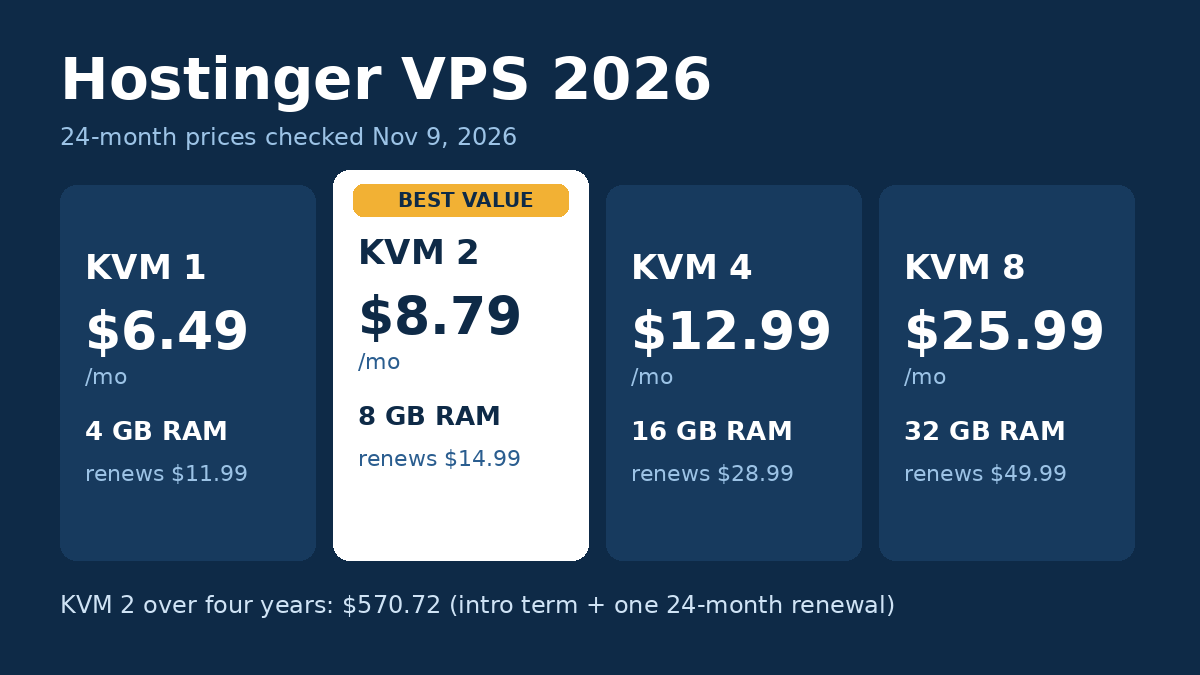
Hostinger VPS is one of the cheapest ways to get your own virtual server with real resources: KVM 2 gives you 2 vCPU cores, 8 GB of RAM and 100 GB of NVMe storage for $8.79 a month on a 24-month term. The catch is that it is self-managed. You get full root access, but you also handle updates, security and setup yourself. Choose it if you are comfortable on a server, or want to run apps like Docker. If you only need WordPress sites without touching a server, a managed plan suits you better. Our Hostinger n8n guide shows one such app installed from a ready-made template.
Prices were checked on November 9, 2026 on Hostinger’s US VPS pricing page, and plan details on October 18, 2026 on its VPS plan details page. Performance figures come from VPSBenchmarks’ 2026 trials of all four plans, with dates listed below.
Who wrote this: Ayoub Gheblawi, founder of Host Test Lab, with 7 years of experience building and running affiliate websites.
How this review was made: I compared Hostinger’s official US prices and plan details, worked out the four-year cost of every plan, and used VPSBenchmarks’ independent 2026 test results for performance. I run my own sites on Namecheap shared hosting, so this review notes where a self-managed VPS needs more work than shared hosting.
| Question | Short answer |
|---|---|
| Cheapest plan | KVM 1, $6.49/mo for 24 months |
| Best value | KVM 2, $8.79/mo (2 vCPU, 8 GB RAM) |
| Renewal | $11.99 to $49.99/mo |
| Payment | Paid upfront for the full term |
| Managed? | No, self-managed with root access |
| Backups | Free weekly, plus manual snapshots |
| Money-back | 30 days |
Black Friday: code BLACKFRIDAY gives an extra 10% off Hostinger plans at checkout, until December 6.
Hostinger VPS plans and what they really cost
Hostinger sells four KVM VPS plans. The low prices apply to a 24-month term, and all plans are paid upfront: the monthly rate is the total divided by the months in the plan. After the first term, each plan renews at a higher rate for the next two years.
| Plan | vCPU / RAM | NVMe storage | Bandwidth | Intro price (24 months) | Paid upfront | Renewal |
|---|---|---|---|---|---|---|
| KVM 1 | 1 / 4 GB | 50 GB | 4 TB | $6.49/mo | $155.76 | $11.99/mo |
| KVM 2 | 2 / 8 GB | 100 GB | 8 TB | $8.79/mo | $210.96 | $14.99/mo |
| KVM 4 | 4 / 16 GB | 200 GB | 16 TB | $12.99/mo | $311.76 | $28.99/mo |
| KVM 8 | 8 / 32 GB | 400 GB | 32 TB | $25.99/mo | $623.76 | $49.99/mo |
All prices are from Hostinger’s official US pricing page. The page also shows higher list prices, $19.49 for KVM 1 up to $73.99 for KVM 8, as the struck-through “before” price.
The four-year cost
Assumptions: one 24-month intro term, then one 24-month renewal at the listed renewal price; no tax, add-ons or paid control panel licenses.
| Plan | Years 1–2 | Years 3–4 | Four-year total | Average per month | Cost per GB of RAM, per month |
|---|---|---|---|---|---|
| KVM 1 | $155.76 | $287.76 | $443.52 | $9.24 | $2.31 |
| KVM 2 | $210.96 | $359.76 | $570.72 | $11.89 | $1.49 |
| KVM 4 | $311.76 | $695.76 | $1,007.52 | $20.99 | $1.31 |
| KVM 8 | $623.76 | $1,199.76 | $1,823.52 | $37.99 | $1.19 |
KVM 2 is the sweet spot. It costs only $2.30 a month more than KVM 1 on the intro term, but doubles the CPU, RAM and storage, so the price per GB of RAM drops from $2.31 to $1.49 over four years. The renewal jump is real but smaller than on many shared plans: KVM 2 goes from $8.79 to $14.99, about 1.7 times the intro price. KVM 4 more than doubles, from $12.99 to $28.99. Because the term is paid upfront, plan the $210.96 for KVM 2 as a single payment on day one.
What is included, and the limits that matter
Self-managed: the biggest decision
Hostinger describes its VPS as a self-managed product with full root access and full customer control. That means you install the software, apply updates and keep the server secure. Hostinger adds some tools to help: a managed firewall, DDoS protection, a malware scanner and its free Hostinger Agent AI assistant, plus an AI web terminal. Those make day-to-day work easier, but they do not replace a sysadmin. If the words “SSH” and “root” make you nervous, this is the wrong product. Our guide to what managed WordPress hosting is shows what you hand over on a managed plan instead.
Backups: weekly, not daily
Every plan includes free weekly backups, plus manual snapshots you can take before a big change and roll back to. There is no daily backup listed. For a busy site or a store, a week is a long time to lose, so take a snapshot before every update and keep your own backups as well. October 2026’s PHP security fix is one example: Hostinger left that update to VPS owners, as our PHP version update guide explains.
Control panels and apps
A VPS has no control panel by default. Hostinger’s VPS plan details page lists one-click templates for cPanel, Plesk, CyberPanel and DirectAdmin, and the pricing page mentions templates such as Docker. The page does not say which panels carry a separate license fee, so check that before you choose one. For comparison, I run my own sites on Namecheap shared hosting, where cPanel comes ready and I install WordPress with a one-click installer. On a VPS, you build that setup yourself first. For an AI agent, our Hostinger OpenClaw guide shows the Docker Manager route step by step.
Extras worth knowing
- Dedicated IP: included on every KVM plan.
- Free domain: a free .cloud or .tech domain for the first year on any 12-month or longer VPS plan.
- Hardware: AMD EPYC processors, NVMe storage and a 1 Gbps network, per Hostinger’s page.
- Locations: VPSBenchmarks lists Hostinger VPS data centers in the US, UK, France, the Netherlands, Lithuania, India, Singapore and Brazil. For a US audience, choose the US location.
Hostinger VPS performance: what independent tests show
VPSBenchmarks runs repeated trials on all four plans and grades each one against every other VPS plan it has tested. A grade is relative, not an absolute score, but it shows where each plan sits.
| Plan (latest trial) | Web performance | Raw CPU | Disk I/O | Network |
|---|---|---|---|---|
| KVM 1 (May 28, 2026) | D (8.5/20) | E (3.5/20) | C (10.5/20) | E (4.4/20) |
| KVM 2 (Oct 10, 2026) | B (15.4/20) | C (10.9/20) | C (12.5/20) | D (7.4/20) |
| KVM 4 (Aug 26, 2026) | D (9.0/20) | C (11.8/20) | D (9.2/20) | E (6.4/20) |
| KVM 8 (Jul 12, 2026) | C (11.1/20) | B (16.6/20) | B (15.1/20) | D (7.8/20) |
Two patterns stand out. KVM 2 scored best on web performance of the four plans, with a B, which supports it as the value pick. And network scores are weak across the board, between E and D, so a VPS here is better for running apps and sites than for moving large files. A separate VPSBenchmarks run on KVM 4 in Lithuania, on February 27, 2026, measured 930 Mbit/s download to New York, close to the 1 Gbps network Hostinger lists, and about 485 MB/s of combined 4K disk read and write.
Which Hostinger VPS plan to choose
- KVM 1 ($155.76 upfront): one small app or a test server. It had the lowest CPU and network grades of the four plans, so do not run a busy site on it.
- KVM 2 ($210.96 upfront): the default pick for a few WordPress sites or a handful of Docker apps, with the best web-performance grade in the latest trials.
- KVM 4 ($311.76 upfront): only when you need the 16 GB of RAM or 4 cores. Its latest web-performance grade was a D, below KVM 2, so upgrade for memory, not for speed.
- KVM 8 ($623.76 upfront): heavy workloads. It had the best CPU and disk grades, B in both, at the lowest cost per GB of RAM.
Support and moving your site
Hostinger lists 24/7 live chat with its support team, plus the Hostinger Agent AI assistant, on its contact page. It does not list a phone line. On a self-managed VPS, support can help with the platform, but setting up and fixing your own software is your job. If you are moving a WordPress site from shared hosting, our guide on how to move a WordPress site to a new host covers the steps, and our shared vs VPS hosting guide helps you decide whether you need a VPS at all.
Who Hostinger VPS suits, and who should look elsewhere
- Developers and tinkerers on a budget: choose KVM 2. You get 8 GB of RAM for $570.72 over four years, about $1.49 per GB a month.
- Self-hosted apps such as Docker containers or automation tools: choose KVM 2 or KVM 4. Root access and app templates make this easy if you know what you are installing. For AI agents, see our best VPS for OpenClaw picks.
- WordPress beginners: KVM 2 can work if you lean on the Hostinger Agent, but a self-managed server with weekly backups is still more risk than a managed plan. Our list of the best VPS hosting for beginners compares both routes.
- Stores that cannot lose a day of orders: look elsewhere, or add your own daily backups, because only weekly backups are included.
- Anyone who wants to pay monthly: look elsewhere. Every plan is paid upfront for the full term.
Two alternatives to Hostinger VPS
Hostinger Cloud Startup is the managed option from the same company. It costs $383.52 for 48 months, with 4 CPU cores and 4 GB of RAM, and you do not manage the server yourself. Our Hostinger review covers it in detail. For its renewal price and limits, see our Hostinger cloud hosting review.
Cloudways is the managed cloud option, billed monthly with no upfront payment. Its DigitalOcean Premium 4 GB server costs $54 a month, or $2,592 over four years, far more than KVM 1 with the same 4 GB of RAM, but you get server management and staging included. See our Cloudways vs Hostinger comparison for the full picture.
Final recommendation
Hostinger VPS is a strong buy if you can manage a server yourself. KVM 2 is the plan to pick: 2 vCPU cores and 8 GB of RAM for $210.96 upfront, the best web-performance grade of the four plans, and a renewal of $14.99 a month that stays well below most managed hosting. If you want to host WordPress sites without touching the server, choose a managed plan instead.
Explore Hostinger hosting options
Hostinger VPS FAQ
Is Hostinger VPS managed?
No. Hostinger calls it a self-managed product. It includes a managed firewall, DDoS protection and a malware scanner, but you are responsible for the software, updates and security on the server.
Does Hostinger VPS have a money-back guarantee?
Yes, every VPS plan is covered by a 30-day money-back guarantee. Because the whole 24-month term is paid upfront, that window is your chance to test the server before you are locked in.
How fast can I get a Hostinger VPS running?
VPSBenchmarks measured an average provisioning time of 135 seconds across 12 server creations, so a new VPS is ready in a little over two minutes.
What happens to the price after two years?
The plan renews for another two years at the higher rate: $11.99 a month for KVM 1, $14.99 for KVM 2, $28.99 for KVM 4 and $49.99 for KVM 8. Our Hostinger renewal price guide explains how renewals work across Hostinger’s plans.