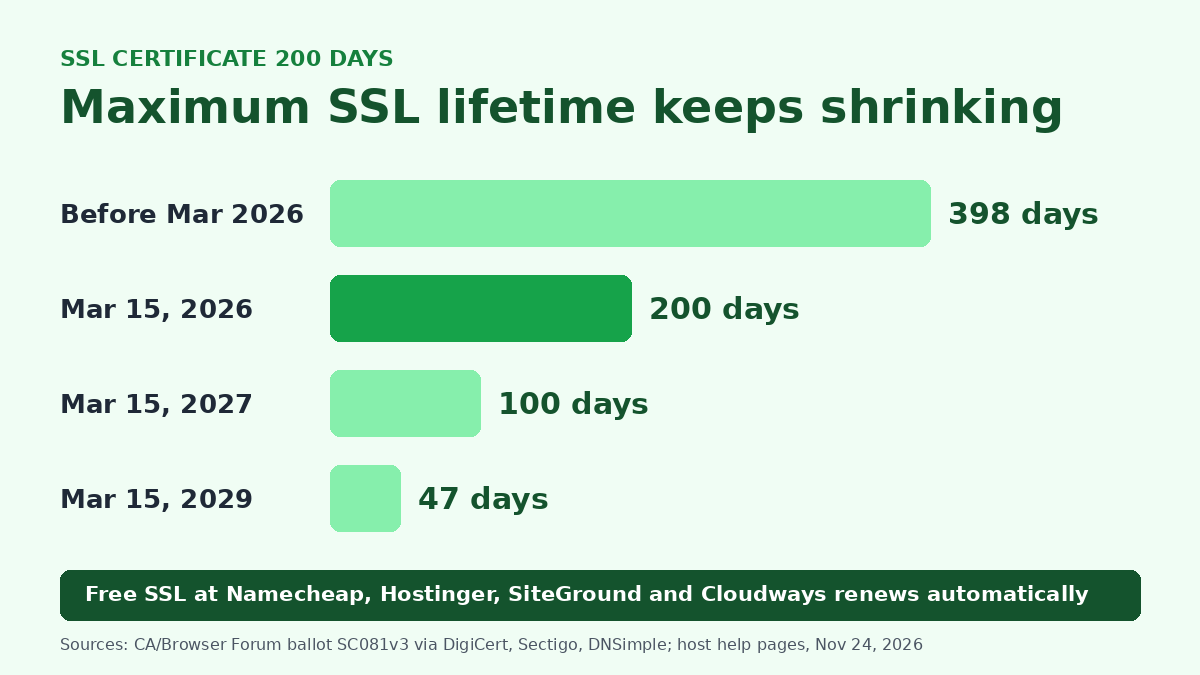
An SSL certificate 200 days long is now the maximum: since March 15, 2026, no public certificate authority may issue an SSL/TLS certificate valid for more than 200 days, down from 398. If your host gives you its free SSL, as Namecheap shared hosting, Hostinger, SiteGround and Cloudways all do, the change asks nothing of you, because those certificates already renew automatically. It matters if you bought a paid certificate and installed it by hand: that file now has to be reissued and reinstalled about every 200 days, and the limit drops to 100 days in March 2027. These rules were checked on November 24, 2026 in CA/Browser Forum summaries from DigiCert, Sectigo and DNSimple, Let’s Encrypt’s announcement, and the four hosts’ own SSL help pages.
The SSL certificate 200 days rule and what comes next
The CA/Browser Forum, the group of browsers and certificate authorities that sets the rules, approved ballot SC081v3 in 2025. It cuts certificate lifetimes in three steps:
| Certificates issued from | Maximum validity | Renewals needed per year |
|---|---|---|
| Before March 15, 2026 | 398 days | About 1 |
| March 15, 2026 | 200 days | About 2 |
| March 15, 2027 | 100 days | About 4 |
| March 15, 2029 | 47 days | About 8 |
Certificates issued before the cutoff keep their original term until they expire. The first 200-day certificates, issued in mid-March, began expiring in early October 2026; March 15 plus 200 days is October 1. Some certificate authorities set their limit a day lower to stay inside the rule: DigiCert issues a maximum of 199 days, and Namecheap’s help center says its certificates switched to 200 days on March 12, 2026.
The reason is security. A shorter certificate limits how long a stolen or wrongly issued certificate can be used. The practical effect is that renewing by hand once a year is gone; at 47 days, a manual process would mean about eight installs a year per site.
Free host SSL: already automatic at all four hosts
| Host | Free SSL | Renewal, in the host’s words | Condition |
|---|---|---|---|
| Namecheap shared hosting | Namecheap SSL, installed by a cPanel plugin | “Automatic and does not require any action from you” | Domain must point to the hosting server |
| Hostinger | Lifetime SSL on Web, Cloud and Agency plans | Renews automatically “for as long as the website is hosted at Hostinger” | Domain pointed to Hostinger; files cannot be moved to another host |
| SiteGround | Let’s Encrypt | Valid 90 days, renewed automatically 30 days before expiry | None stated |
| Cloudways | Let’s Encrypt | “These certificates renew automatically” | Domain added to the app and DNS pointed to Cloudways |
Two of these were never affected by the 200-day step. Let’s Encrypt certificates, used by SiteGround and Cloudways, were already 90 days, which is why those hosts renew them on a schedule. Let’s Encrypt will still shorten its own default: to 64 days from February 10, 2027, and to 45 days from February 16, 2028. Hosts that automate renewal absorb that change too.
The condition column is where sites actually break. Every host renews only while your domain points to its servers, so if you move DNS elsewhere, or change hosts and leave the old SSL behind, the next renewal can fail. When you switch, issue a fresh certificate at the new host; our guide on moving a WordPress site to a new host includes that step, and the Cloudways migration guide covers it for Cloudways.
Check Namecheap plans Check Hostinger plans
Paid SSL certificates: what changes when you prepay
Paid certificates are still sold by the year. Namecheap’s SSL page lists its Standard SSL from $5.99 a year, renewing at $6.99, and its help center says you can still prepay for up to five years. What you buy now is coverage, not one long certificate. Namecheap describes a multi-year plan as “prepaying for a sequence of 200-day certificates”, each issued at no extra charge until your paid term runs out.
The catch is the reissue. Namecheap states that if a certificate is not reissued before its end date, HTTPS stops working, and that skipped days are not added to the end of the plan. On a one-year purchase, that means at least one reissue and reinstall halfway through the year. Namecheap offers three ways to avoid doing it by hand:
- Namecheap SSL on shared hosting: reissued by the cPanel plugin.
- Web-based automation (SSL Proxy): reissues and installs the certificate while prepaid time remains, but needs Namecheap DNS and supports single-domain and wildcard certificates only.
- Manual certificates: Namecheap says it sends alerts 30 days before expiry.
I run my own sites on Namecheap shared hosting, and Namecheap emails me before it makes changes on its side, which is the kind of notice this rule makes useful. Our Namecheap cPanel guide shows where the SSL plugin sits.
Who needs to act, and who does not
- No action: a blog, affiliate site or small store on its host’s free SSL, with the domain pointed at that host. Renewal is the host’s job at all four.
- Check once: anyone using Cloudflare or a third-party DNS in front of the site. Confirm the host’s SSL still renews, or use the proxy’s own certificate.
- Act now: anyone with a paid OV, EV or multi-domain certificate installed manually. Put a reissue date in your calendar every 200 days, or move to an automated option before the 100-day limit in March 2027.
- VPS users: on an unmanaged server, renewal runs only if you set up a client such as Certbot. With Let’s Encrypt heading to 45 days, test that its schedule runs.
Verdict
The SSL certificate 200 days limit changes nothing for most website owners on shared or managed hosting: Namecheap, Hostinger, SiteGround and Cloudways all renew their free certificates automatically. It does change paid, hand-installed certificates, which now need a reissue about twice a year, rising to about eight times a year by 2029. If you pay for a basic certificate only to get the padlock, the host’s free SSL does the same job without the reissues.
Visit SiteGround Visit Cloudways
FAQ
Do I lose money on a multi-year SSL I already bought?
Not at Namecheap, as long as you reissue on time. Its help center says the years you pay for are the years you get, with each 200-day certificate issued at no extra fee. Skipped time is lost, though, so a missed reissue costs you the gap.
What happens when my SSL expires?
Browsers show a security warning and many visitors leave. Namecheap’s help center states plainly that HTTPS stops working when an unreissued certificate reaches its end date. Our guide to what happens when web hosting expires covers the hosting side.
Does domain validation get shorter too?
Yes. Let’s Encrypt cuts the time it reuses a domain check from 30 days to 10 days in February 2027 and to 7 hours in February 2028, so the renewal tool must be able to prove domain control each time. Hosts that issue the SSL on their own servers handle this check for you.