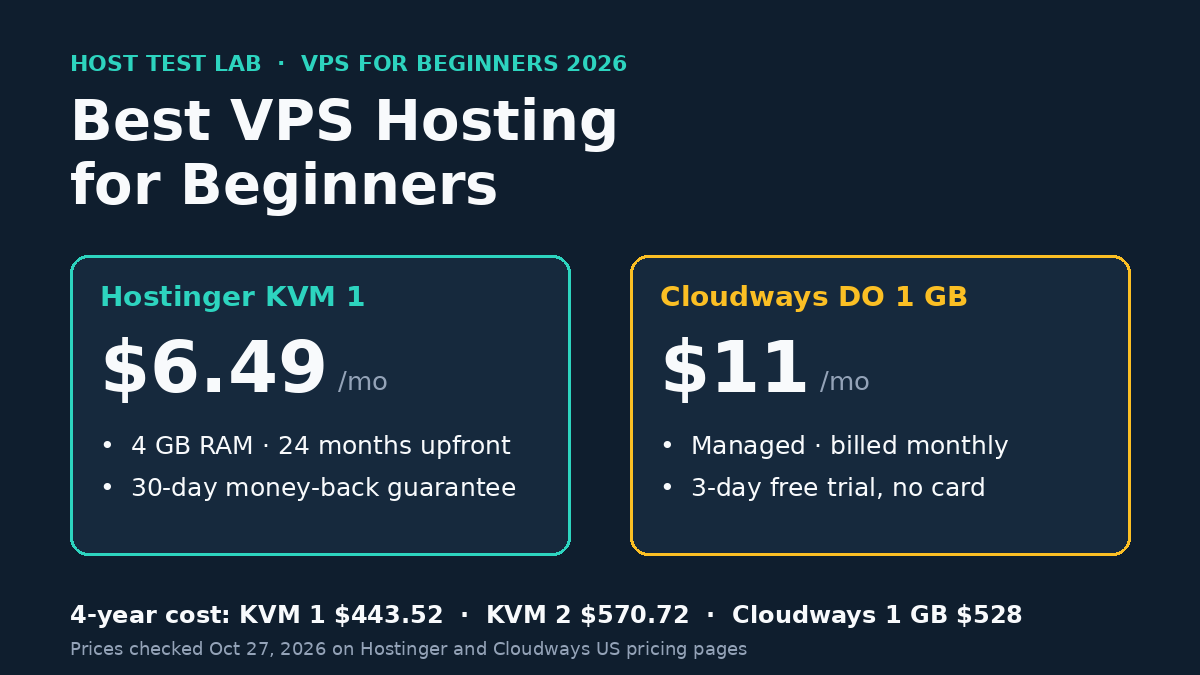
The best VPS hosting for beginners comes down to two choices. Pick Hostinger KVM 1 or KVM 2 if you want the lowest bill and an AI assistant that runs server commands for you. Pick Cloudways if you want a managed server for WordPress, billed monthly, with engineers handling the stack. Hostinger KVM 1 costs $155.76 for its first 24 months. Cloudways starts at $11 a month with no contract.
Prices and plan details were checked on October 27, 2026 on Hostinger’s US VPS pages and Cloudways’ pricing page. Performance figures come from VPSBenchmarks trials of Hostinger KVM 2 run in April and October 2026.
| Pick | Best for | Starting price | Renewal | Key limit |
|---|---|---|---|---|
| Hostinger KVM 1 | Lowest cost, learning a VPS | $6.49/mo (24 months upfront) | $11.99/mo | Self-managed |
| Hostinger KVM 2 | Several sites or apps like n8n | $8.79/mo (24 months upfront) | $14.99/mo | Self-managed |
| Cloudways (DigitalOcean) | Hands-off WordPress hosting | $11/mo, billed monthly | Same price | Less RAM per dollar |
Check Hostinger VPS plans Explore Cloudways plans
Black Friday: code BFCM802 gives 80% off Cloudways for 2 months (up to $200 off a month), until November 30.
How these picks were chosen
A beginner’s VPS has to solve one problem first: who runs the server. A plain VPS gives you root access and leaves updates, security and software setup to you. Each pick here handles that job in a different way, so the list is judged on four points:
- Help with server work: an AI agent that executes commands, or a managed platform with 24/7 support.
- Total cost: the intro price, the term you must prepay, and the renewal price.
- A safe way to try it: a refund window or a free trial.
- Room to grow: what the next plan up costs.
If you only run one small blog, a VPS may be more than you need. Our guide to shared vs VPS hosting shows where shared hosting stops being enough, and our list of the best hosting for beginners covers the cheaper shared options.
1. Hostinger KVM 1: the cheapest way to start on a VPS
Best for: beginners who want a real server for little money and are willing to learn.
KVM 1 gives you 1 vCPU, 4 GB of RAM, 50 GB of NVMe storage and 4 TB of bandwidth. The intro price is $6.49 a month, but all plans are paid upfront, so the real first bill is $155.76 for 24 months. After that, it renews at $11.99 a month for the same term.
What makes it workable for a beginner is Hostinger Agent. Hostinger sells these plans as “AI-managed VPS” and says the agent executes the actual commands on your server, asking for confirmation before any destructive action. Hostinger’s own FAQ calls the service a good fit for first-time VPS users with no technical background. That is the provider’s claim, and the limit is clear in the regular VPS FAQ: you are responsible for your virtual private server, while Hostinger looks after the physical machines.
Every plan includes free weekly backups, firewall management, a free domain for one year and a 30-day money-back guarantee. The one-click app list includes WordPress, n8n and OpenClaw. Our Hostinger refund policy guide covers what the 30 days apply to. Our Hostinger OpenClaw setup guide shows how that install works.
Key limit: one vCPU, and you still own the server. If the agent cannot fix something, the job is yours.
2. Hostinger KVM 2: the best VPS for most beginners who plan to grow
Best for: running several WordPress sites, or WordPress plus an app such as n8n, on one server.
KVM 2 doubles everything: 2 vCPUs, 8 GB of RAM, 100 GB of NVMe storage and 8 TB of bandwidth. It costs $8.79 a month on the intro term, which is $210.96 for 24 months, and renews at $14.99 a month. For $2.30 a month more than KVM 1, you get twice the memory, and memory is usually what runs out first when you add apps.
KVM 2 is also the plan VPSBenchmarks tested twice in 2026, so it has independent data behind it:
| VPSBenchmarks trial | Location | Web performance | CPU | Stability | Network | Overall |
|---|---|---|---|---|---|---|
| April 13, 2026 | USA | B | D | A | E | 63 |
| October 10, 2026 | Dusseldorf, Germany | B | C | C | D | 60 |
VPSBenchmarks grades each result against every other plan it has tested, from A to F, and the overall score runs from 0 to 100. The pattern across both trials is solid web performance (B both times) and weak network transfer scores (D and E). For a website, the web score matters more than raw network transfers. Our Hostinger VPS guide covers the plans in more depth.
Key limit: the 24-month prepay. Hostinger’s VPS page lists no monthly term, so you commit to two years to get the intro price.
3. Cloudways: the best managed VPS for WordPress beginners
Best for: beginners who want the speed of their own server without touching server software.
Cloudways runs managed servers on clouds such as DigitalOcean, Vultr, AWS and Google Cloud. You pick the server, and Cloudways sets up and maintains the stack. It bills hourly and charges in arrears, so there is no contract and no upfront payment. On DigitalOcean, the prices on October 27, 2026 were:
| DigitalOcean server | RAM / vCPU | Storage | Standard | Premium |
|---|---|---|---|---|
| Micro | 1 GB / 1 | 25 GB | $11/mo | $14/mo |
| Small | 2 GB / 1 | 50 GB | $24/mo | $28/mo |
| Medium | 4 GB / 2 | 80 GB | $46/mo | $54/mo |
Premium servers use NVMe storage, and Standard servers use regular SSDs. Every plan includes 24/7 live chat and ticket support, free SSL, free staging, automated backups and a free migration of your first website. Cloudways describes the 1 GB Micro server as suitable for personal websites and simple blogs. You can test it with a 3-day free trial that needs no credit card. Our Cloudways free trial guide shows what to check in those three days.
Key limit: you get less server for the money. Cloudways’ 4 GB Standard server costs $46 a month, while Hostinger KVM 1 has 4 GB of RAM for $6.49 a month on its intro term. Extras also add up: offsite backup storage costs $0.033 per GB, and email is a Rackspace add-on at $1.50 per mailbox per month.
What each pick costs over four years
The intro prices hide the real gap. This table assumes you keep each plan for four years: Hostinger’s two-year intro term plus one two-year renewal, and Cloudways billed every month at today’s price. Prices exclude tax.
| Plan | RAM | Years 1–2 | Years 3–4 | 4-year total | Average per month |
|---|---|---|---|---|---|
| Hostinger KVM 1 | 4 GB | $155.76 | $287.76 | $443.52 | $9.24 |
| Hostinger KVM 2 | 8 GB | $210.96 | $359.76 | $570.72 | $11.89 |
| Cloudways DO Standard 1 GB | 1 GB | $264.00 | $264.00 | $528.00 | $11.00 |
| Cloudways DO Premium 1 GB | 1 GB | $336.00 | $336.00 | $672.00 | $14.00 |
Over four years, Hostinger KVM 2 costs about the same as Cloudways’ smallest server but has 8 times the RAM. What the Cloudways price buys is management: someone else keeps the server stack running, and you can cancel any month. Hostinger asks for $155.76 or more on day one. Cloudways spreads the cost out. Our Cloudways pricing guide breaks down the add-ons.
Which beginner VPS should you choose?
- You want the lowest total cost: Hostinger KVM 1, at $443.52 over four years.
- You plan to add sites or run n8n or OpenClaw: Hostinger KVM 2, with 8 GB of RAM for $11.89 a month on average. Our guide to the best VPS for OpenClaw also compares the managed options.
- You only run WordPress and never want to log into a server: Cloudways, from $11 a month.
- You cannot pay two years upfront: Cloudways, since it bills monthly in arrears.
For most people, the best VPS hosting for beginners is Hostinger KVM 2. It gives room to grow at a low four-year cost, and the AI agent covers the server work a beginner would otherwise get stuck on. If you would rather pay more so that a managed platform handles the server, start the 3-day Cloudways trial instead.
Check Hostinger VPS plans Explore Cloudways plans
FAQ
Is Hostinger VPS managed?
Not in the traditional sense. Hostinger’s VPS FAQ says you are responsible for your server, while Hostinger handles the physical machines. Hostinger Agent can run setup and troubleshooting commands for you, but no engineer manages the server on your behalf.
Can I pay for a beginner VPS monthly?
On Cloudways, yes. It charges hourly and sends one invoice in the first week of each month. Hostinger’s VPS page shows only 24-month terms, all paid upfront.
Where are the servers located?
Hostinger says its VPS plans run in 10 data centers across 4 continents, including Boston, and you can change the location later. Cloudways lists more than 50 data centers across its cloud providers.
What happens if a beginner outgrows the first plan?
On Cloudways, vertical scaling is included, so you can move to a bigger server from the dashboard. On Hostinger, the step from KVM 1 to KVM 2 raises the renewal price from $11.99 to $14.99 a month.