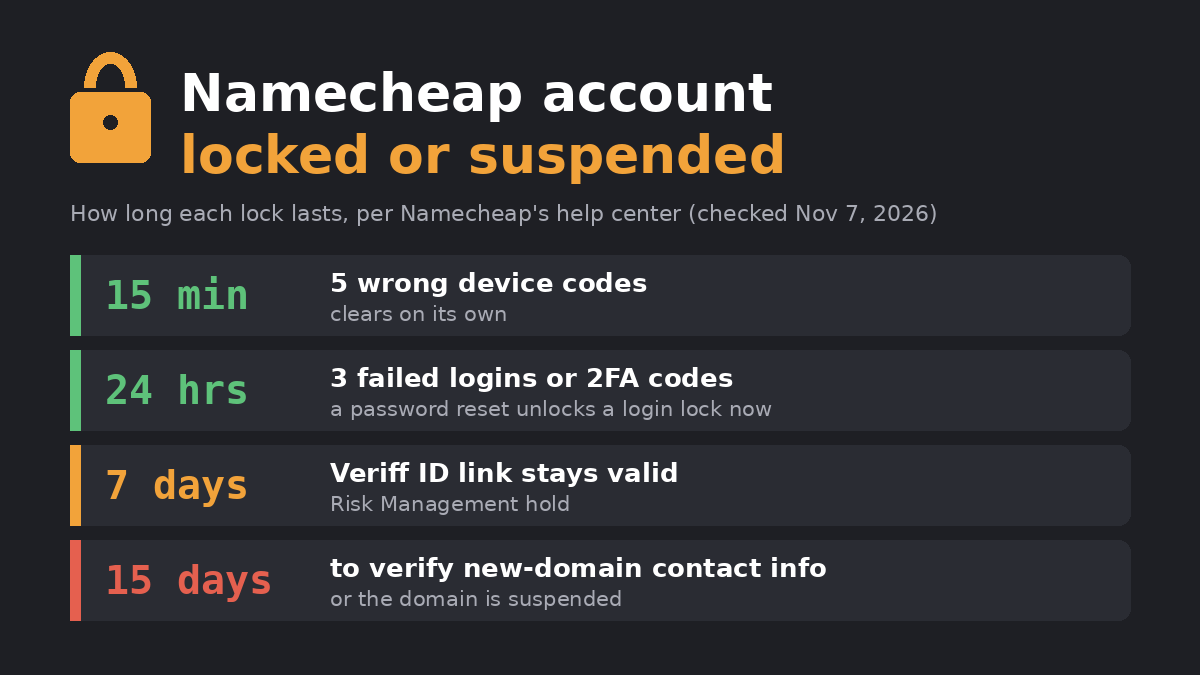
A Namecheap account locked message usually has one of two causes: too many failed login, device or two-factor codes, or a security hold placed by Namecheap’s Risk Management team. Login locks clear on their own within 15 minutes to 24 hours. A Risk Management lock stays until you answer Namecheap’s email, and your domains and services may be suspended in the meantime. The rules below were checked on November 7, 2026 in Namecheap’s knowledge base articles on account locks, verification, domain suspension and compromised accounts, and in its domain Registration Agreement.
Which lock do you have?
| Trigger | How long it lasts | Fix |
|---|---|---|
| 3 failed password or username attempts in a row | 24 hours | Reset the password for immediate access, or wait |
| 5 wrong trusted-device codes in a row | 15 minutes | Wait for the countdown, then request a new code |
| 3 failed 2FA codes (SMS, OneTouch or app) | Up to 24 hours | Wait; contact Support if it continues |
| Payment flagged as possible fraud, a chargeback, or suspicious activity | Until resolved | Answer the Risk Management email |
| Terms of Service violation | Permanent | Notice goes to your profile email |
The first three are lockouts you caused by mistyping. The last two are decisions Namecheap made about the account, and those are the ones that can take your websites and email offline.
How to fix a Namecheap account locked by login attempts
- Check the basics first. Namecheap’s own checklist starts with typos, Caps Lock and the keyboard language, because three wrong tries trigger the 24-hour lock.
- Reset the password. The password reset page gives immediate access after a password lock, so you do not have to wait the full 24 hours.
- For a device-code lock, wait 15 minutes. Then request a new code. You can resend the verification email up to 5 times an hour, so check your spam folder before requesting another one.
- For a 2FA lock, wait up to 24 hours. The account unlocks automatically. If it does not, contact Namecheap Support through live chat.
Locked by Risk Management: verification, fraud and payment holds
This is the lock behind most “Namecheap account suspended” searches. Namecheap’s article lists three triggers: a payment its fraud system flags, a payment problem such as a chargeback, and activity that suggests someone else got into the account. It also warns that your services may be suspended while the lock is in place.
- Find the email. Instructions go to the email address on your Namecheap profile. Search that inbox and its spam folder for messages from Risk Management.
- Complete the ID check if asked. Namecheap collects identity documents only through Veriff, a third-party platform. The Veriff link is valid for 7 days and must be finished on a smartphone. You photograph both sides of a government-issued ID and take a selfie.
- Never send ID by email. Namecheap says it will never ask for private documents as an email attachment. A message asking for that is not from Namecheap.
- Reply with your details. If you cannot find the email, write to security@namecheap.com. Namecheap’s suspension article asks you to include the Engagement ID from the notice, your username and your Support PIN.
Why every domain can go down at once
Namecheap’s Registration Agreement says that if it has grounds to suspend a service on one domain, it may suspend all services in the account, including your other domains. No fee is refunded when services are suspended for cause. A separate clause lets Namecheap suspend access to all your accounts after a chargeback.
That is what one customer described in an October 2026 post on Reddit’s r/sysadmin forum. By his account, he missed an email giving him 72 hours to complete an “account information accuracy” check, and every domain in the account was disabled. His business email ran on one of those domains, and so did the contact address on his Namecheap profile, so the warning could not reach him. This is one customer’s report, and Namecheap has not explained the trigger publicly, but the clause above shows how a single lock can spread to every domain.
Namecheap account suspended vs domain suspended
A suspended domain is not always a suspended account. The most common domain suspension is ICANN’s contact check: new generic domains must have their registrant contact details verified within 15 days of registration, or after a change to the registrant’s name or email. If you miss it, the domain is pointed to verification nameservers and visitors see a suspension page. Clicking the link in the “Action required: Verify your contact information” email typically lifts the suspension within several minutes, plus DNS propagation time. If the email is missing, open the suspended domain in a browser and use the resend option at the bottom of the page.
Namecheap’s suspension article lists 18 reasons in total, from phishing and malware reports to unanswered information requests and UDRP disputes. Abuse cases go to legalandabuse@namecheap.com, where you can dispute the suspension. Namecheap states that if a domain cannot be unsuspended, a refund or transfer is not possible.
If your sites went down but the account itself is fine, the problem may be on Namecheap’s side instead. Our Namecheap outage guide covers what failed during the 2026 incident and what kept working.
If you think someone got into your account
Namecheap’s compromised-account article lists the warning signs: orders you did not place, an EPP code you did not request, missing domains, or password reset emails you did not trigger. Change your password, turn on two-factor authentication and security notifications, reset the passwords on your related email accounts, and contact Support. If Namecheap investigates, it may lock the account and domains against changes, but the article states this does not mean downtime for your services.
How to avoid a lock next time
- Keep your profile email off your own domains. Every lock notice goes to that address. If it runs on a domain in the same account, a suspension cuts you off from the email that explains how to fix it. A free mailbox at a separate provider avoids that loop. Namecheap emails me before it makes changes on its side, which only helps if the email arrives.
- Turn on 2FA and security notifications. Notifications send an email every time someone logs in or changes something in the account.
- Save your Support PIN. Namecheap asks for it when you reply to a suspension notice.
- Talk to Namecheap before filing a chargeback. A chargeback is a listed reason for both an account lock and a domain suspension.
- Answer verification requests the same day. The Veriff link expires after 7 days, and the r/sysadmin case describes a 72-hour notice.
If you use Namecheap mailboxes for business, our Namecheap email hosting guide explains which plan your email runs on. If a lock has made you rethink the company, our Namecheap alternatives list compares the costs of moving, and the Namecheap hosting review covers what you would give up.
FAQ
Will my website go down if my Namecheap account is locked?
Not after a login lock: those only block you from signing in. A Risk Management lock can suspend services, and a ToS violation suspends them permanently. During a hacking investigation, Namecheap says the lock blocks changes but does not cause downtime.
Can I get a refund if Namecheap suspends my domains?
No. The Registration Agreement says no fee is refunded when services are suspended for cause, and the suspension article adds that a refund or transfer is not possible if the domain cannot be unsuspended.
Which Namecheap email address handles which problem?
Account locks go to security@namecheap.com, abuse and appeals to legalandabuse@namecheap.com, transfer disputes to transferdisputes@namecheap.com, and Whois verification problems to domainsupport@namecheap.com, which Namecheap lists as available 24/7.