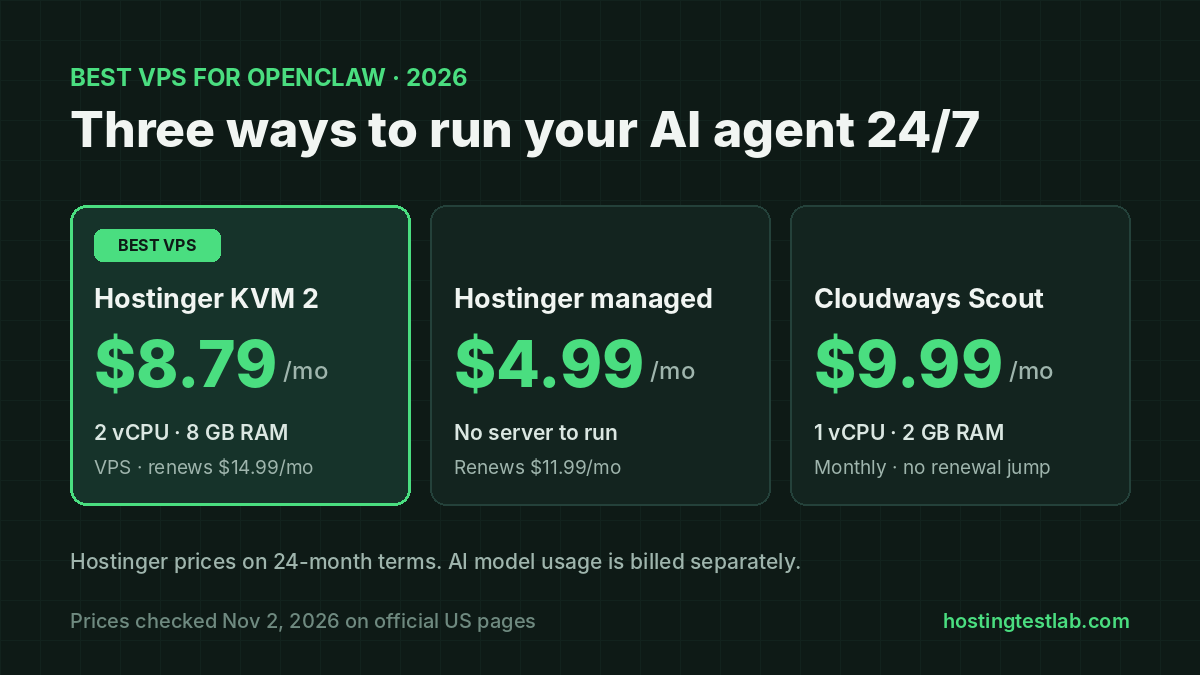
The best VPS for OpenClaw for most people is Hostinger KVM 2: 2 vCPU cores and 8 GB of RAM for $8.79 a month on a 24-month term, with OpenClaw installed from a one-click template. It is also the plan Hostinger itself recommends for OpenClaw. If you don’t want to run a server at all, Hostinger’s managed OpenClaw plan starts at $4.99 a month, and Cloudways’ managed OpenClaw starts at $9.99 a month with no long contract and no renewal jump. Prices were checked on November 2, 2026, on Hostinger’s and Cloudways’ US OpenClaw pages, and setup facts on their help guides and OpenClaw’s install docs.
How these picks were chosen
OpenClaw is an open-source AI agent. It runs around the clock, connects to chat apps such as WhatsApp, Telegram and Slack, and uses an AI model you pick to carry out tasks. That makes the host a 24/7 job, so the picks were judged on four points:
- Memory: Cloudways’ setup guide puts the minimum at 2 GB of RAM, and Hostinger recommends its KVM 2 plan, which has 8 GB.
- Who runs the server: on a plain VPS you handle updates, HTTPS and security yourself; on a managed plan the host does.
- The AI model bill: whether you must bring your own API key, or can use credits or a subscription you already pay for.
- Four-year cost: the first bill plus renewals, because an always-on agent is not something you switch off after a month.
Best VPS for OpenClaw: the picks compared
| Plan | Type | CPU / RAM | First bill | Renewal | AI model |
|---|---|---|---|---|---|
| Hostinger KVM 2 | VPS, you manage it | 2 vCPU / 8 GB | $210.96 for 24 months | $14.99/mo | Your own key, or AI credits as a checkout add-on |
| Hostinger managed OpenClaw | Managed app | Not listed | $119.76 for 24 months | $11.99/mo | AI credits, ChatGPT Plus or Pro, or your own key |
| Cloudways Scout | Managed server | 1 vCPU / 2 GB | $9.99 a month | $9.99/mo | Your own key only |
| Cloudways Operator | Managed server | 2 vCPU / 4 GB | $19.99 a month | $19.99/mo | Your own key only |
The surprise is memory per dollar. Hostinger KVM 2 gives 8 GB of RAM for $8.79 a month on its 24-month term, while Cloudways charges $39.99 a month for 8 GB on its Squad plan. You pay for that gap with your own time, because the Hostinger VPS is yours to look after.
1. Hostinger KVM 2: the best VPS for OpenClaw
Best for: anyone comfortable with a server who wants the most memory for the money.
Price: $8.79 a month on the 24-month term ($210.96 upfront), renewing at $14.99 a month for the same term. Hostinger labels these as Black Friday prices, so check the current price before you buy.
KVM 2 has 2 vCPU cores, 8 GB of RAM and 100 GB of NVMe storage. Hostinger’s install guide recommends KVM 2 or higher for OpenClaw, so skip the cheaper KVM 1 even though it is listed on the same page: it has 4 GB of RAM and 1 vCPU core. You pick OpenClaw at checkout, enter your settings and click Deploy, and Hostinger’s Docker Manager installs it. You get full root access, a firewall, DDoS protection and free weekly backups. Our step-by-step Hostinger OpenClaw setup guide walks through each screen.
The key limit is that the server is yours to run. Hostinger’s guide shows the OpenClaw dashboard on a plain IP address and port, and its troubleshooting section says the control panel needs HTTPS, so adding an SSL certificate is your job. You also connect the AI model: your own key from OpenAI, Anthropic, Gemini or xAI, or Hostinger’s AI credits added at checkout. Keep the auto-generated gateway token safe, because it is the login to your agent. If you are new to servers, our guide to the best VPS hosting for beginners explains what a VPS leaves to you.
2. Hostinger managed OpenClaw: the cheapest way with no server work
Best for: people who want an OpenClaw assistant on Telegram or WhatsApp and never want to see a terminal.
Price: $4.99 a month on the 24-month term ($119.76 upfront), renewing at $11.99 a month. The 12-month term costs $95.88 and renews at $13.99 a month; month to month it is $10.99 for the first month, then $21.99.
This isn’t a VPS you control. Hostinger runs OpenClaw for you and handles security, updates and backups. The model setup is the easiest of the three picks. You can use Hostinger’s AI credits, which you buy and top up in the dashboard. You can also connect a ChatGPT Plus or Pro subscription you already pay for, or bring your own API key. The same plan also runs Hermes Agent, n8n or Paperclip instead of OpenClaw. The limits: you can only switch by deleting the running app, and Hostinger says your settings and chat history don’t carry over. Hostinger also doesn’t list the CPU or memory behind the plan. If your agent will need custom setup, Hostinger itself points developers to its VPS plans instead.
3. Cloudways OpenClaw: managed hosting with no lock-in
Best for: people who want a managed server, terminal access and monthly billing with no long-term contract.
Price: Scout costs $9.99 a month with 1 vCPU, 2 GB of RAM and 50 GB of storage. Operator costs $19.99 a month with 2 vCPU, 4 GB and 80 GB. Cloudways bills by the hour and lists no renewal price increase.
Cloudways installs OpenClaw, renews the SSL certificate, tests OpenClaw updates before rolling them out, and takes automatic backups with one-click restore. Every plan includes terminal access, so you can run OpenClaw commands and move files. You choose the server region. Cloudways’ guide says Scout’s 2 GB is the minimum OpenClaw needs. Its plan page calls Scout the solo plan and Operator the plan for small teams.
There are three limits to know. First, you must bring your own API key, because Cloudways includes no AI credits. Second, the free trial doesn’t cover OpenClaw: Cloudways’ guide says trial accounts can’t launch it. Third, Cloudways’ guide lists bigger-server upgrades without rebuilding as a planned feature, so pick your size carefully. Our Cloudways pricing guide covers how its hourly billing works.
Explore Cloudways hosting options
Black Friday: code BFCM802 gives 80% off Cloudways for 2 months (up to $200 off a month), until November 30.
What OpenClaw hosting costs over four years
| Plan | RAM | 4-year total | Average per month |
|---|---|---|---|
| Hostinger managed OpenClaw | Not listed | $407.52 | $8.49 |
| Cloudways Scout | 2 GB | $479.52 | $9.99 |
| Hostinger KVM 2 | 8 GB | $570.72 | $11.89 |
| Cloudways Operator | 4 GB | $959.52 | $19.99 |
Totals assume a 24-month Hostinger term followed by 24 months at the renewal price, and 48 months of Cloudways billing. They cover hosting only, without taxes or AI model usage. Hostinger KVM 2 costs $91.20 more than Cloudways Scout over four years but has four times the memory. Hostinger needs $210.96 upfront, while Cloudways spreads the cost monthly. Your AI model bill comes on top of all four. On Cloudways and on a VPS with your own key, your model provider bills you directly, and Cloudways says watching that usage is your job. For how Hostinger’s renewal jumps compare across its plans, see our Hostinger VPS guide.
Which OpenClaw hosting should you choose?
- You can follow a setup guide and want room to grow: Hostinger KVM 2. Its 8 GB of RAM costs less over four years than Cloudways’ 4 GB Operator plan.
- You want no server work and already pay for ChatGPT Plus or Pro: Hostinger managed OpenClaw, at $119.76 for two years.
- You want managed hosting but no two-year commitment: Cloudways Scout at $9.99 a month, billed hourly.
- A small team will share the agent: Cloudways Operator, the plan Cloudways sizes for small teams, or Hostinger KVM 2 if you can manage the server.
For most readers, the best VPS for OpenClaw is still Hostinger KVM 2, because no other pick here gives 8 GB of RAM for under $15 a month, even after renewal. For a wider look at both hosts beyond OpenClaw, read our Cloudways vs Hostinger comparison.
Check Hostinger plans Explore Cloudways hosting options
FAQ
How much RAM does OpenClaw need?
Cloudways’ guide sets 2 GB as the minimum, and its smallest plan has exactly that. Hostinger recommends its KVM 2 VPS or larger, which has 8 GB. OpenClaw’s own install docs list the software it needs (Node 24, or Node 22.16 and newer) but don’t set a RAM figure.
Is OpenClaw free?
The software is open source. You pay for two things: the server it runs on, and the AI model it uses. On Cloudways, the model is always billed separately by your provider. Hostinger’s managed plan is the only pick here that lets you use a ChatGPT Plus or Pro subscription instead of a pay-per-use API key.
Can I try OpenClaw on the Cloudways free trial?
No. Cloudways’ setup guide says OpenClaw needs an active paid account, and trial accounts can’t launch it. Our Cloudways free trial guide explains what the trial does cover. Hostinger’s managed OpenClaw plan has a 30-day money-back guarantee instead.