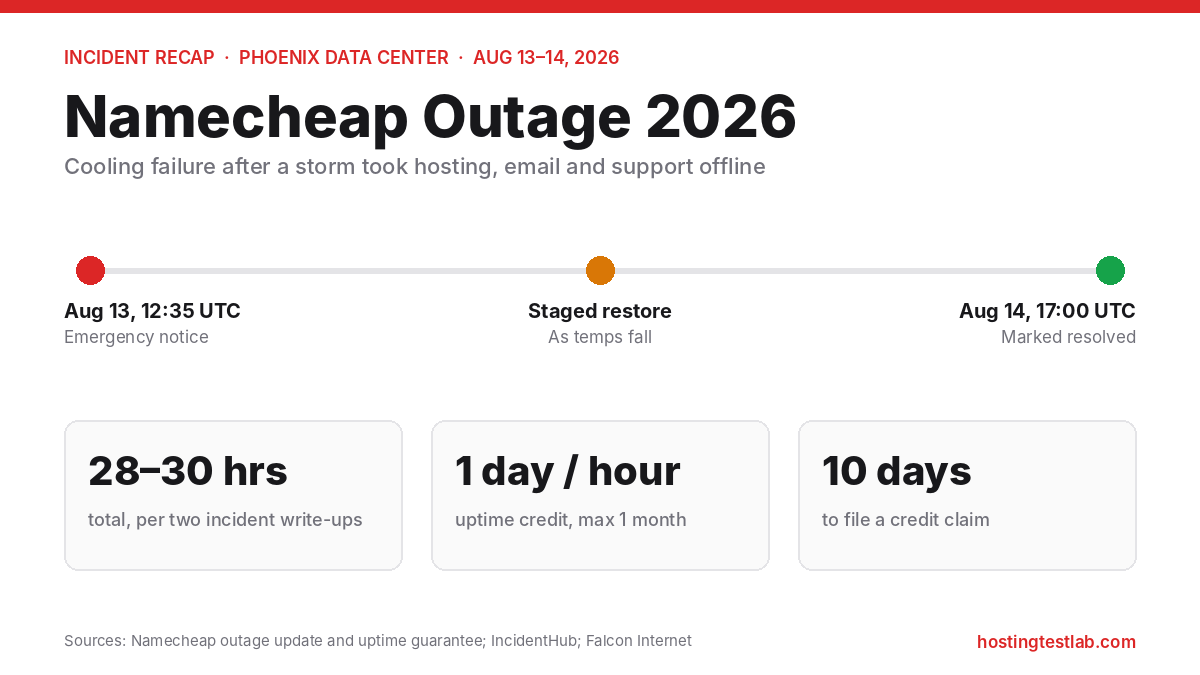
The big Namecheap outage of 2026 started on August 13, when a storm knocked out cooling at the Phoenix data center Namecheap uses, run by RadiusDC. Shared, VPS and dedicated hosting, EasyWP, Private Email, Namecheap’s own website and its support desk all went down or became unreliable. The incident ran until Namecheap marked it resolved at 17:00 UTC on August 14, roughly 28 to 30 hours from the first reports. It was a serious failure, but a single event with a clear physical cause, not a pattern of daily downtime. Facts below come from Namecheap’s outage update, its uptime guarantee and hosting pages (checked October 31, 2026), and incident write-ups by Domain Name Wire, Engadget, IncidentHub and Falcon Internet.
What happened during the Namecheap outage
| When (UTC) | What happened | Source |
|---|---|---|
| Aug 13, overnight in Phoenix | Heavy storms hit the area; the data center’s cooling fails and temperatures rise | Namecheap outage update; Engadget |
| Aug 13, 12:35 | Namecheap posts emergency maintenance, naming the cooling failure | IncidentHub; Falcon Internet |
| Aug 13, about 19:00 | Namecheap’s CEO expects services to start returning around 3:00 to 3:30 pm Eastern; restoration then runs in stages once temperatures fall to safe levels | Engadget; Namecheap outage update |
| Aug 14, 17:00 | Incident marked resolved | IncidentHub; Falcon Internet |
Namecheap’s CEO, Hillan Klein, wrote the company’s outage update. It names RadiusDC as the operator; some early reports blamed PhoenixNAP, and Namecheap corrected that. According to Domain Name Wire, Namecheap called the site a Tier 3 facility with a high level of redundancy that had never had this kind of outage in its 25-year history. That is Namecheap’s claim, not an independent audit. The two incident write-ups put the total at 28.5 and 30.5 hours, so “about a day and a quarter” is the fair summary.
What went down, and what kept working
- Down or degraded: shared, VPS and dedicated hosting; EasyWP sites, which showed database connection errors during recovery; Namecheap.com and the account dashboard; billing; live chat and email support.
- Private Email: customers couldn’t send mail, but Namecheap says incoming mail was delayed, not lost.
- DNS: Namecheap says DNS zones kept resolving and URL redirects kept working; only DNS management was unavailable. Domain Name Wire reported the same.
The support outage made it worse. With chat, tickets and the dashboard all down at once, there was no way to ask for help or change settings until the dashboard came back. Namecheap says it will add more redundancy across its data centers, which also include Europe and Asia, and that a thorough review is underway.
Can you get compensation for a Namecheap outage?
Namecheap’s uptime guarantee covers Stellar, Stellar Plus and Stellar Business shared plans at 100% a month. For unplanned downtime, it gives one day of extra hosting for each hour your site was down, up to one month free. Three conditions matter:
- 10-day deadline: you must open a ticket with Namecheap’s Billing department within 10 calendar days of the downtime. For the August outage, that window closed in late August.
- Exclusions: the terms exclude “any act of God or force majeure”, and this outage started with a storm. Whether the guarantee applies is “solely determined” by Namecheap.
- It’s the only remedy: the credit is extra hosting time, not cash, and Namecheap excludes lost sales or other indirect losses.
On paper, a 28-hour outage would earn 28 days of hosting, just under the one-month cap. Namecheap’s outage update does not mention credits, so the practical lesson is to file a ticket within 10 days next time and let Namecheap decide.
How to protect your site on Namecheap
I run my own sites on Namecheap shared hosting, so this outage is close to home. Four steps limit the damage from an outage like this one:
- Keep a backup off Namecheap’s servers. Stellar includes backups twice a week, and Stellar Plus and Stellar Business add AutoBackup. Those copies live with Namecheap, so download a full backup now and then, especially before big changes. If a data center goes down for days, an off-site copy is what lets you move hosts.
- Use an outside uptime monitor. During this outage, Namecheap’s own website was down for part of the time. A free external monitor tells you the moment your site goes down, which also starts your 10-day clock for a credit claim.
- Write down your DNS records. DNS kept resolving this time, but management was locked. Having your records in a file means you can recreate them at another provider if you ever need to. The same file helps if your Namecheap account is locked and every domain is suspended.
- Know your data center. Namecheap offers US, UK, EU and Singapore locations for shared hosting. Its Cloud Storage option, which Namecheap claims gives 100% uptime, comes with Stellar Business in the US data center and with all Stellar plans in the EU and Singapore data centers. Pick the location closest to your visitors, and know which one you’re on.
For search rankings, a one-off outage of about a day is unlikely to cause lasting harm. Our guide on whether web hosting affects SEO explains what Google does when a site returns errors, and why repeated failures matter more than a single one.
Should you leave Namecheap after the outage?
For most small sites, one outage of about a day is not enough reason to move on its own. Moving costs time and carries its own risk. The better reasons to leave are a pattern of repeated downtime, or a site that loses real money for every hour it’s offline. If your site earns daily and you can’t accept another day of downtime, a host with more automatic failover is worth paying for. Our Namecheap alternatives guide compares the options, and moving a WordPress site to a new host covers the switch. If you’re weighing whether to stay, the Namecheap hosting review covers its plans, renewal prices and independent uptime tests.
FAQ
Is Namecheap down right now?
Namecheap posts live incidents on its status updates page, under categories such as Shared Servers, VPS and Private Email. During the August outage, Namecheap’s own website was also affected, so an outside uptime monitor is the more reliable check.
Did customers lose data in the Namecheap outage?
Namecheap’s outage update says incoming Private Email was delayed, not lost, and it does not report lost website data. Sites came back in stages once the data center’s temperatures were back to safe levels.
Were domains affected by the Namecheap outage?
Domains kept working. Namecheap says DNS zones kept resolving and redirects kept working, so domains pointed at other hosts stayed online. What you couldn’t do was change DNS settings or manage domains in the dashboard until it came back.