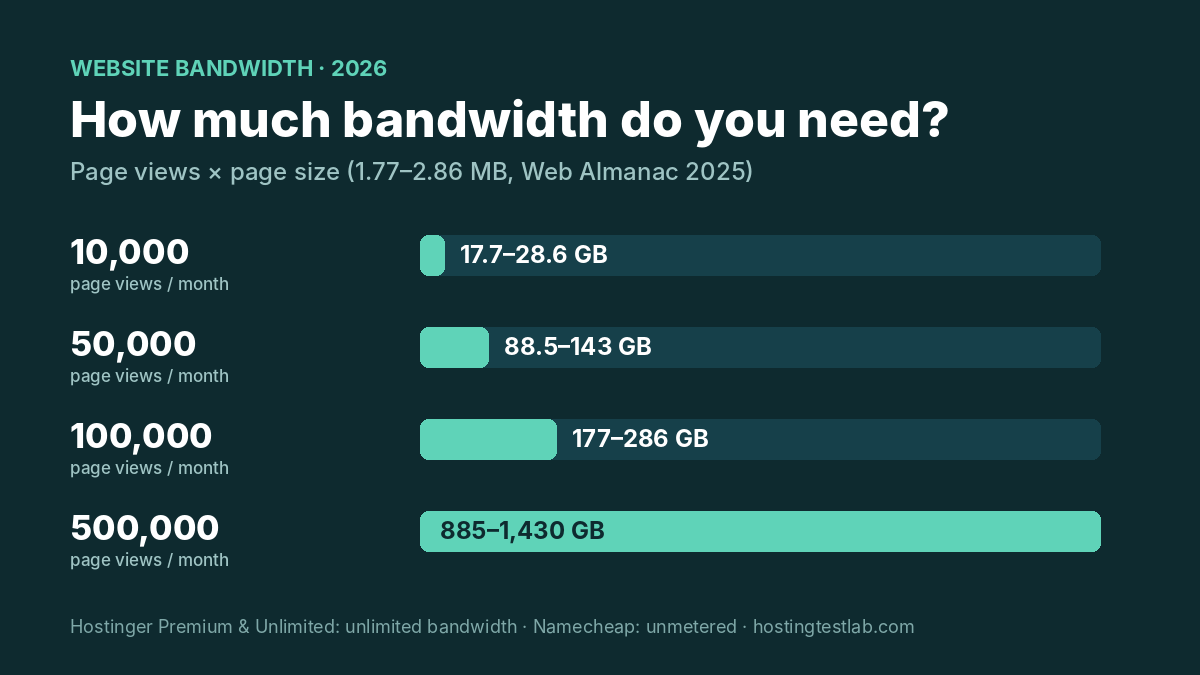
How much bandwidth do I need for my website? For most sites, far less than hosting ads suggest. A typical page weighs about 1.8 to 2.9 MB, so 10,000 page views a month use roughly 18 to 29 GB, and even 100,000 page views stay under 300 GB. That is why bandwidth is rarely the limit that stops a small site: Hostinger Premium and Unlimited list unlimited bandwidth, and Namecheap’s shared plans are unmetered. The limits you hit first are CPU, memory and file counts.
Page sizes come from the HTTP Archive Web Almanac 2025 (July 2025 crawl). Plan limits were checked on October 22, 2026 on Hostinger’s US web hosting and pricing pages, its plan-limits help page (updated October 9, 2026) and Namecheap’s unmetered hosting policy (updated April 27, 2025).
How to work out how much bandwidth your website needs
The formula is simple:
Monthly bandwidth = monthly page views × average page size
For the page size, the Web Almanac 2025 gives these medians:
| Page type | Mobile | Desktop |
|---|---|---|
| Home page | 2.56 MB | 2.86 MB |
| Inner page (posts, products) | 1.77 MB | 1.96 MB |
Most visits on a blog or affiliate site land on inner pages, so 1.8 MB is a fair everyday figure and 2.9 MB a cautious upper one. Images make up much of that weight: the median mobile home page loads 911 KB of images alone, which is why a photo-heavy site sits at the top of the range.
Bandwidth by traffic level
Assumptions: page sizes of 1.77 MB (low) and 2.86 MB (high) from the table above, every page view loading the full page with nothing cached, and 1 GB counted as 1,000 MB. Real use is usually lower, because returning visitors’ browsers reuse cached files.
| Page views per month | Bandwidth (low) | Bandwidth (high) | Typical site |
|---|---|---|---|
| 10,000 | 17.7 GB | 28.6 GB | New blog or niche site |
| 50,000 | 88.5 GB | 143 GB | Growing affiliate site |
| 100,000 | 177 GB | 286 GB | Established blog or small store |
| 500,000 | 885 GB | 1,430 GB | Large content site |
To use your own numbers, take last month’s page views from your analytics and check one typical page’s size in your browser’s developer tools (the Network tab shows the total transferred). Multiply the two. If you have no traffic yet, start with the first row.
What Hostinger and Namecheap actually include
| Plan | Bandwidth | The limit that matters more |
|---|---|---|
| Hostinger Web Single (not on the US pricing page) | 100 GB | 1 CPU core, 1 GB RAM, 200,000 inodes |
| Hostinger Premium | Unlimited | 1 CPU core, 2 GB RAM, 400,000 inodes, 40 PHP workers |
| Hostinger Unlimited | Unlimited | 2 CPU cores, 3 GB RAM, 600,000 inodes, 60 PHP workers |
| Hostinger KVM 1 VPS | 4 TB | Your own server resources |
| Namecheap Stellar plans | Unmetered | CPU, memory, entry processes and inodes |
Hostinger’s Web Single plan is the only one here with a hard bandwidth cap, and you will not see it as a new US buyer: Hostinger’s US web hosting and pricing pages, checked on October 22, sell only Premium and Unlimited, both with unlimited bandwidth. Single still appears on the limits page, so it matters if you have an older or non-US account. Its 100 GB covers about 35,000 to 56,000 page views a month at the page sizes above. Premium and Unlimited have no cap at all, and Hostinger’s help page says the listed limits are fixed: to get more resources, you upgrade the plan.
Hostinger no longer publishes a visitor estimate per plan: its current US pricing pages give none. A TechRadar article from June 2025 quoted 25,000 monthly visits for a $2.99 Hostinger plan, an older listing that no longer appears. That leaves the formula above as the more reliable guide.
Namecheap says unmetered means it does “not strictly limit traffic” to your sites. What it does limit is CPU, memory, entry processes and inodes. If your usage starts to affect the server, its team contacts you and suggests fixes or an upgrade. One rule matters for some site types: storing or streaming large volumes of video and other media is prohibited on its shared servers.
I run my own sites on Namecheap shared hosting with many domains on one plan, and the price and fast online support are why I stay. For text-and-image sites, traffic is not the limit to watch on an unmetered plan; the shared CPU and memory are. Our what is shared hosting guide lists those limits plan by plan.
Check Hostinger plans Check Namecheap plans
When bandwidth really does matter
- Video you host yourself: a single video file can weigh more than hundreds of normal pages, and Namecheap’s shared servers prohibit large-scale media streaming. Host videos on a video platform and embed them.
- Large downloads: PDFs, software or image packs served thousands of times a month add up fast. Check those files’ sizes the same way as a page.
- Photo portfolios: full-size images push pages toward the top of the range. Our guide to the best hosting for photographers covers plans for image-heavy sites.
- Very high traffic: past several hundred thousand page views, a VPS with a stated allowance, such as Hostinger KVM 1’s 4 TB, gives you a fixed number to plan around. Our shared vs VPS hosting guide explains when that switch pays off.
Verdict: how much bandwidth do I need for my website?
For most blogs, affiliate sites and small business sites, the answer to “how much bandwidth do I need for my website” is under 30 GB a month at 10,000 page views and under 300 GB at 100,000. Any plan with unlimited or unmetered bandwidth covers that, so choose your plan by its CPU, memory and file limits instead. If you are on an older capped plan such as Hostinger Web Single, plan an upgrade before you pass about 35,000 page views a month, and keep large videos off shared hosting.
Website bandwidth FAQ
Is unlimited bandwidth really unlimited?
The traffic itself is not capped, but the server resources behind it are. On Hostinger Premium, for example, 40 PHP workers limit how many uncached page requests the site can handle at the same moment, which a sudden traffic spike can reach before any bandwidth question comes up.
What is the difference between bandwidth and storage?
Storage is how much your files take up on the server; bandwidth is how much data is sent to visitors each month. A 2 MB page uses 2 MB of storage once, but 2 GB of bandwidth if it is viewed 1,000 times.
Does a caching plugin or CDN reduce bandwidth?
Browser caching cuts repeat downloads for returning visitors, and a CDN serves files from its own network instead of your host. Both lower the bandwidth your hosting plan serves, which matters most on a capped plan like Hostinger Web Single.